

When configuring proxy servers, networking tools, or automation software, you will often encounter two primary versions of the SOCKS (Socket Secure) protocol: SOCKS4 and SOCKS5. Understanding how these protocols work—and choosing the right one—is critical for performance, security, and compatibility.
What is SOCKS?
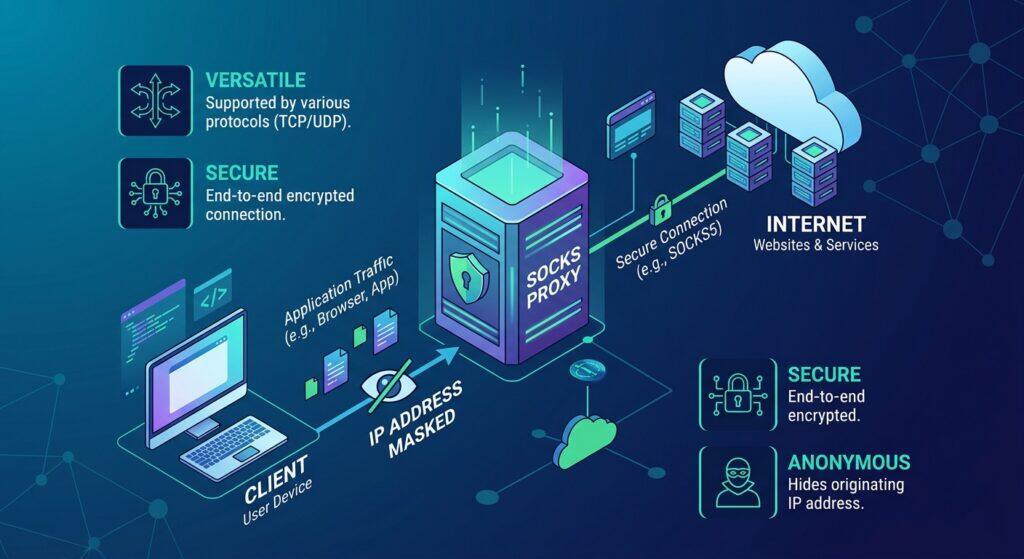
SOCKS is a network protocol that routes packets between a client and a server through a proxy server. Unlike HTTP proxies, which only understand web traffic (HTTP/HTTPS), SOCKS proxies operate at a lower level in the network stack. They can handle any type of TCP or UDP traffic generated by a program, making them highly versatile for tasks ranging from web scraping and gaming to secure remote access.
SOCKS4’s Core Capabilities and Limitations
SOCKS4 is the older version of the SOCKS protocol. It still works today, but only in limited situations.
High Simplicity and Low Overhead
Its main strength is simplicity. SOCKS4 moves TCP traffic through a proxy server. That means basic tasks like web browsing or simple file downloads can run without much extra load. The protocol has very little overhead. In older systems or low-power devices, this can feel faster than newer options.
Lack of UDP Support
SOCKS4 does not support UDP. Games, video calls, and many streaming apps need UDP. They simply fail or run poorly over SOCKS4.
No Real Authentication
It also has no real authentication. Anyone who knows the proxy IP and port can use it. There is no username or password check. This creates security risks in shared or public environments.
Vulnerable DNS Handling and Privacy Leaks
DNS handling is another weak point. SOCKS4 usually lets the client resolve domain names. That can leak your real IP address. SOCKS4a improved this a bit by letting the proxy handle the name, but support is not universal.
In short, SOCKS4 still has a place for legacy tools and very simple TCP jobs.
SOCKS5’s Core Capabilities and Upgrades
SOCKS5 was built to fix the clear gaps left by SOCKS4. When you look at SOCKS4 vs SOCKS5, the upgrades show up in real daily use.
Wider Protocol Support
SOCKS5 handles both TCP and UDP. This single change opens many doors. Online games, video calls, and torrent clients need UDP. They often fail or lag on SOCKS4. With SOCKS5, these apps run much more smoothly.
I watched a gaming group switch last year. Their voice chat kept dropping on SOCKS4. After moving to SOCKS5, the cuts almost disappeared. The difference was immediate.
Real Authentication Options
SOCKS5 lets you add a username and password. SOCKS4 has no true login control. Anyone who finds the proxy can use it. That risk disappears with SOCKS5.
Teams that share proxies gain clear benefits here. You can limit access and track usage. This extra control makes SOCKS5 far safer for business or group work.
Better DNS Handling and Privacy
SOCKS5 can resolve domain names on the proxy side. This lowers the chance of leaking your real IP. SOCKS4 usually leaves DNS to the client, which creates exposure.
In one scraping project, the old SOCKS4 setup kept revealing the original IP during name lookups. Switching to SOCKS5 stopped the leaks within hours. The data collection became cleaner and more stable.
These upgrades explain why most modern tools prefer SOCKS5. The protocol still has limits, but it removes the biggest pain points found in SOCKS4.
SOCKS4 vs SOCKS5: Key Differences Comparison
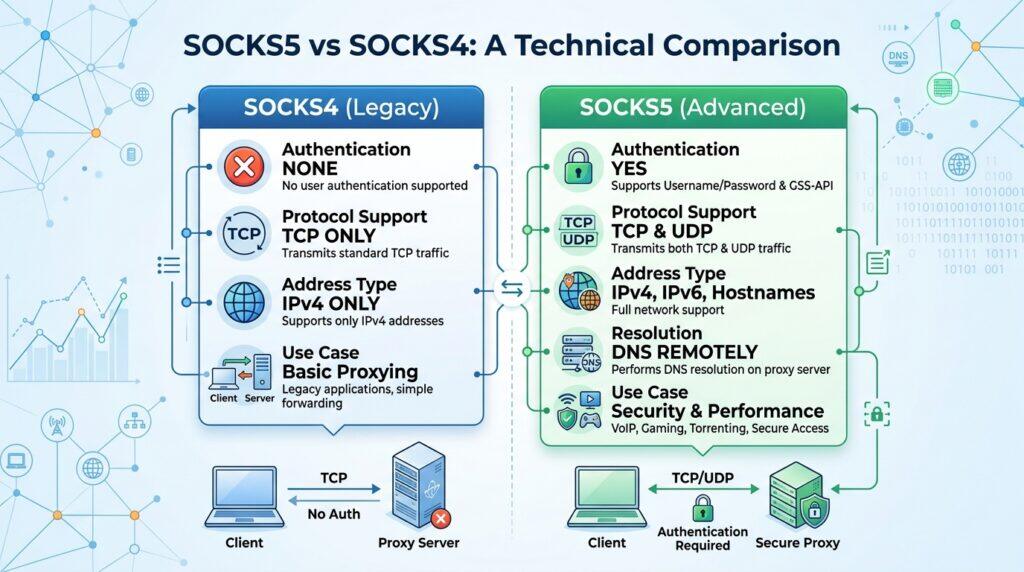
The upgrades in SOCKS5 become even clearer when you place the two protocols side by side. Looking at SOCKS4 vs SOCKS5 this way helps you see exactly where each one wins or falls short.
Detailed Comparison Table:
| Feature | SOCKS4 | SOCKS5 |
| Protocol Support | TCP only | TCP and UDP |
| Authentication | None (only a simple user ID) | Username/password and other methods |
| DNS Handling | Usually client-side (can leak IP) | Can resolve on the proxy side |
| IP Version Support | IPv4 only | IPv4 and IPv6 |
| Performance Overhead | Very low | Slightly higher due to extra features |
| Security Level | Basic | Better control and less exposure risk |
| Best For | Simple or legacy TCP tasks | Modern apps, games, scraping, privacy needs |
SOCKS4 Use Cases
Even after seeing the clear gaps in the SOCKS4 vs SOCKS5 comparison, SOCKS4 still has a few practical places where it works well. These cases are limited, but they exist.
Legacy Systems and Older Software
Some old programs only speak SOCKS4. They were built years ago and never updated. In one company I worked with, an internal file-transfer tool refused every SOCKS5 connection. Switching the proxy to SOCKS4 made the tool run again without any code changes. When the software cannot be replaced, SOCKS4 becomes the only choice.
Simple Forwarding Needs Without Authentication
If you only need basic TCP traffic and do not care about logins, SOCKS4 is enough. A small office once used it to route internal reports through a single proxy. No one needed passwords. The setup stayed simple and stable for months.
Lightweight Tasks That Need Minimal Overhead
SOCKS4 carries less extra data than SOCKS5. On very light scripts that only load simple web pages, the lower overhead can give a small speed edge. I tested this with a basic monitoring script. SOCKS4 finished the checks a fraction faster than SOCKS5 on the same machine.
Resource-Limited or Testing Environments
Old devices or tiny virtual machines sometimes struggle with newer protocols. SOCKS4 needs fewer resources. Students and developers also use it in lab settings to learn how proxies work without extra complexity. It keeps the focus on the basics.
These situations show why SOCKS4 has not fully disappeared. Still, they are narrow. Most current projects move past them once the limits appear.
SOCKS5 Use Cases
While SOCKS4 still fits a few narrow jobs, SOCKS5 covers far more real-world needs. This is where the SOCKS4 vs SOCKS5 difference becomes most useful.
Expert Proxy IP Comparisons & Reviews
In-depth multi-dimensional analysis to help you pick the most cost-effective IPFLY plan
Data Collection and Automation
Scraping tools and automation scripts work better with SOCKS5. It handles both TCP and UDP, and it supports authentication. One data team I advised used to lose connections on SOCKS4 during large runs. After switching to SOCKS5 with rotating residential proxies from IPFLY, their scripts stayed stable even at high volume. For pure high-speed bulk collection where cost matters more, some teams also use IPFLY’s datacenter proxies. Fewer blocks and fewer IP leaks made the whole process cleaner.
Secure Multi-Account Access for Marketing Teams
Managing many accounts needs steady sessions and access control. SOCKS5 lets you add usernames and passwords. This stops unwanted sharing and keeps each account separate. A marketing group running multiple social profiles saw fewer logouts once they moved to authenticated SOCKS5 proxies. Using static ISP residential proxies from IPFLY helped them keep the same clean IP for longer sessions while following each platform’s terms of service.
Gaming, VoIP, and Real-Time Applications
Games and voice apps rely on UDP. SOCKS4 cannot carry it well. SOCKS5 can. Players often notice fewer disconnects and clearer voice chat after the switch. One small gaming community fixed their lag spikes simply by changing the proxy type. The improvement showed up in the first session.
P2P and Torrent Downloads
Torrent clients need both TCP and UDP for trackers and peer discovery. SOCKS5 supports this mix. SOCKS4 usually fails or slows down. Users who move to SOCKS5 often report steadier download speeds and better peer connections.
High Privacy and Cross-Border Access
SOCKS5 can resolve DNS on the proxy side. This reduces IP leaks. It also works well when you need to reach region-locked content. Combined with clean residential proxies, it gives a more natural-looking connection. Many people choose providers like IPFLY when privacy and location flexibility matter at the same time.
How to Choose: Decision Framework
After looking at the use cases, the next step is simple. You need a clear way to decide between the two. The SOCKS4 vs SOCKS5 choice becomes easier when you match the protocol to your real needs.
When SOCKS4 Is Enough
Choose SOCKS4 only when your needs stay very basic. If the tool is old and only supports SOCKS4, you may have no other option. The same applies to simple TCP tasks that need no login and no UDP.
I once helped a small lab keep an aging monitoring script alive. The script refused SOCKS5. SOCKS4 kept it running with almost zero extra work. In cases like this, the older protocol still does the job.
When You Must Use SOCKS5
Most current work needs SOCKS5. Pick it when you use games, voice apps, torrents, or scraping tools. Choose it when you need login control or want to reduce IP leaks. Choose it when you manage many accounts or need steady long sessions.
A marketing team I advised tried to stay on SOCKS4 to save time. Their social accounts kept running into session problems. After they switched to SOCKS5 with authentication, the problems dropped sharply. The extra features paid off within days.
If your work involves anything beyond basic TCP page loads, SOCKS5 is the safer and smarter default. The decision usually becomes clear once you list what your tools actually require.
Practical Setup and Common Pitfalls
Once you decide between the two protocols, the next step is getting the setup right. Small mistakes here can make even a good choice feel broken.
Basic Setup Tips
- Always select the correct protocol version (SOCKS4 or SOCKS5) in your tool.
- Enter the proxy IP, port, username, and password carefully.
- Choosing the wrong protocol is one of the most common reasons for connection failures.
How to Test Properly
- First open a simple webpage to check if the connection works.
- Visit whoer.net or ipleak.net to confirm your IP and check for DNS leaks.
- If you need UDP (for games or torrents), test with those apps directly.
- SOCKS4 usually fails UDP and DNS checks. SOCKS5 should pass them.
Common Pitfalls to Avoid
- Some low-quality proxies claim SOCKS5 support but do not handle UDP correctly.
- DNS may still resolve on the client side and leak your real IP — always verify.
- A single wrong character in the username or password will block the connection.
- In shared environments, avoid using the same credentials at the same time if the provider limits sessions.
Better Proxy Choices Clean residential or ISP proxies usually give more stable results than public ones. Providers that offer rotating residential, static ISP, and datacenter options with full SOCKS5 support, such as IPFLY, make testing and scaling much easier. You can start with residential proxies for higher trust, switch to ISP proxies for long sessions, or use datacenter proxies when you need high volume at lower cost.
Take a few minutes to test properly — it saves hours of frustration later.
Conclusion
When it comes to SOCKS4 vs SOCKS5, the choice depends on what you actually need. SOCKS4 is a simple, lightweight option that still works for older software or basic TCP tasks where authentication and UDP are not required.
SOCKS5 is the better choice for most people today. It supports both TCP and UDP, offers real authentication, handles DNS more safely, and works with modern apps like scraping tools, games, and multi-account setups.
If you are ready to use SOCKS5, pair it with reliable proxies from a provider like IPFLY. Their residential, ISP, and datacenter options make it easy to get the performance and stability you need.






