

In February, a seller I work with lost a marketplace account that had two years of order history on it. The password was saved. The authenticator was on a synced phone, so the codes still worked. But the address the account had been registered with was a ten-minute inbox from the summer of 2024, and when the platform asked for re-verification, the message had nowhere to land. The account is still locked.
The failure was not an email problem. It was a record-keeping problem. Every account you create through a proxy is a bundle of four or five pieces, and the mailbox is the piece people throw away first, because on day one it looks like the disposable part. On the day the platform comes asking questions, it is the only piece that matters.
Quick answer: A temp mail with password setup is not a throwaway address with a login attached. It means the mailbox that receives your verification and recovery mail stays paired with the credentials of the account it belongs to: the password you generated, the 2FA secret if the platform has one, and a note about the proxy exit the account was created from. The mailbox has to still exist when the platform comes back. Everything else is bookkeeping you can automate.
At a glance
- Tool: Boomlify
- Category: Temporary email with built-in password and 2FA storage
- Best for: people running multiple accounts through proxies: marketplaces, social profiles, ad accounts, QA
- Not ideal for: banking, government, healthcare, or anything you cannot afford to lose
- Account required: No. A guest inbox works instantly; an account keeps every inbox in one dashboard
- Free plan: 150 mailboxes, 50 new per day, 60-day inbox validity, 14 days of message storage
- Paid plans: $4.99 to $89.99 per month, validity up to 365 days
- API credits: $1 per 1,000 credits, 50 free every day, reading and listing are always free
Every account is four things, not two
When people say they saved an account, they usually mean the password. The record is bigger than that.
There is the login itself, the address and password the platform stores. There is the mailbox the account was registered with, which is where password resets and re-verification links go. There is the second factor, if you turned it on, which is a secret you have to keep somewhere safer than a screenshot. And when the account was born behind a proxy, there is the exit itself: the country and the IP address the platform saw at signup. Log in from the other side of the world six months later and a lot of platforms will ask you to prove it is you.
The mailbox is the piece people lose. A password can be reset through the email. The email can only be recovered through itself, which is the whole problem. Here is what a single account looks like when you write it out properly:
| Field | Where it usually ends up | What breaks without it |
| Inbox address | A ten-minute site you cannot reopen | Recovery and verification mail has nowhere to arrive |
| Password | Notes app, browser, or memory | Locked out on the next login |
| 2FA secret | One phone, one app, no backup | Locked out even with the password |
| Proxy exit and region | Nowhere. It was never written down | The next login looks like a stranger and triggers review |
| Context notes | Nowhere | You cannot even tell which account this is |
Five fields. One screen if you organize them, three or four tools if you do not. The rest of this article is about getting them onto one screen.
What people actually mean by temp mail with password
Search that phrase and you get two different things wearing the same name.
The first is the classic throwaway: a random address, ten minutes of life, read one email, close the tab. That is genuinely useful for one-time downloads and forms you will never see again. It is a disaster for anything you intend to log back into, because the moment the inbox dies, so does every recovery path attached to it.
The second is what people are usually hunting for when they type that phrase: an address that still works next month, paired with credentials they control, in a place they can find again. In most services the mailbox itself does not take a password. What takes a password, and deserves a record, is the account you built on top of it.
The difference between those two worlds is almost entirely lifespan. A free temp mail address is a starting point; the moment you link it to an account, it becomes something you can keep, rename, extend and find again in a dashboard instead of a browser history. A free inbox carries 60 days of validity, and paid tiers stretch that to 90, 120, 150, 240 and finally 365 days, with message storage running on a separate and usually shorter clock.
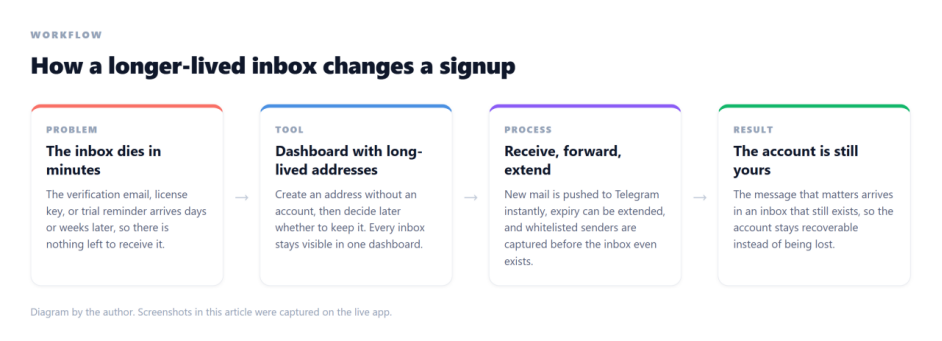
The same idea in four steps: a longer-lived inbox, one dashboard, forwarding and extension, and an account that stays recoverable
That gap is the whole argument. A mailbox that still exists in week six is a recovery path. A mailbox that died in minute ten is a story you tell support.
Why a proxy makes the record longer, not shorter
The proxy is the fifth field, and it matters twice: on the day you register, and on every day after.
At signup, registration funnels and anti-fraud checks look at the exit IP. A datacenter range that thousands of people cycle through daily looks like exactly what it is. A residential address looks like a normal connection in a normal neighborhood, which is why residential proxies are the usual recommendation for signup-heavy work. IPFLY is the one I keep coming back to for this: residential IPs across 190+ countries with city-level targeting, and sticky sessions that let a full registration flow run through a single exit instead of changing address mid-form.
After signup, the account remembers where it was born. If it was created in Manchester and logs in next week from a Singapore datacenter, plenty of platforms will treat that as a hijack attempt and ask for verification. You did nothing wrong, and you still have to pass the check, which is much easier when the inbox from step one is still alive.
So the working rule is one account, one exit, one mailbox, written down together. Rotate freely when you are scraping public pages. Do not rotate the exit of an account you intend to keep: give it a sticky session, or a static residential address from the same ISP pool, and log in from the same region it was created in. The identity stays coherent, and the platform’s risk engine has nothing to raise an eyebrow at.
The setup, in the order that actually works
Order matters. Most people do the email first and think about the network later, which is backwards.
1. Choose the exit before anything else. Decide the country, and the city if the platform is local about it. Then decide what kind of account this is: a one-off check that can rotate, or a keeper that needs the same exit for months. Keeper accounts get a static residential or sticky session so next week’s login matches this week’s signup.
2. Create the mailbox and name it like a record. client-platform-01 beats sunnybunny99 every time. You are not naming it for today, you are naming it for the person who reads it in a year, who is also you. The generator lets you pick the prefix and the domain, so a consistent naming scheme costs nothing.
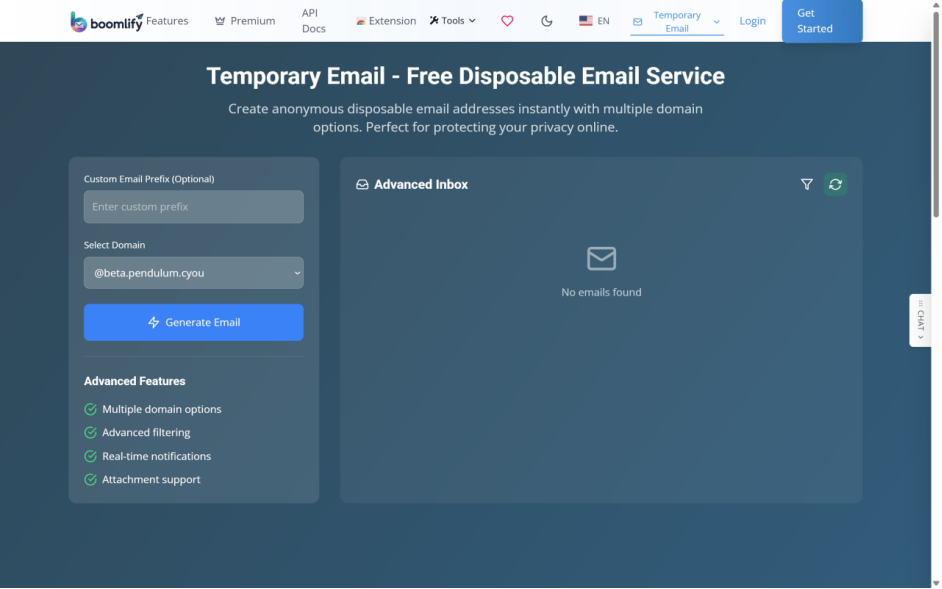
Picking the prefix and the domain on the public generator page: the name is the first field of the record
3. Generate the password at signup time, not later. The mistake is choosing something memorable and then reusing it across five accounts, which links all five the moment one leaks. The built-in password generator has presets, a length slider and a live strength meter, and it keeps its history locally in the browser, so passwords are not uploaded anywhere.
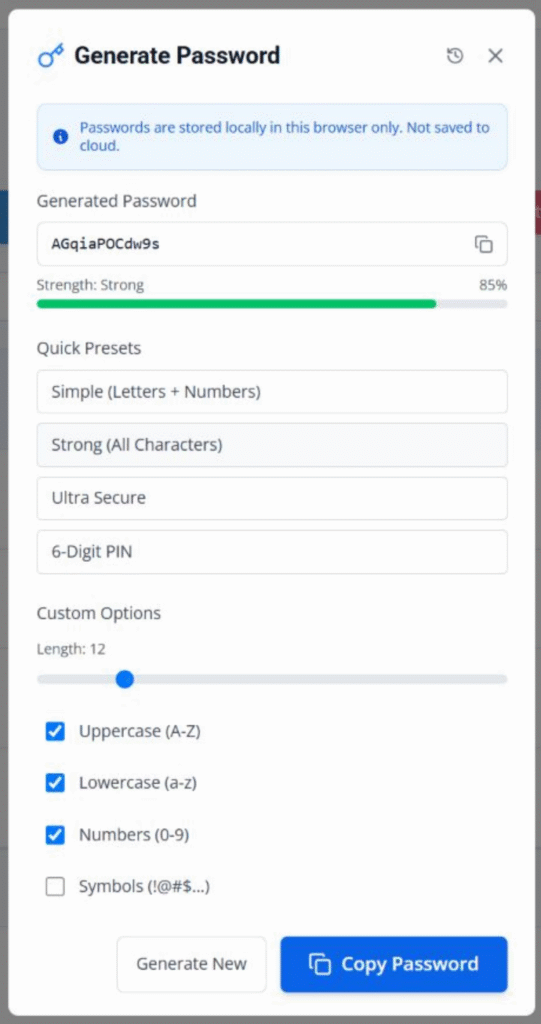
The password generator: strength meter, presets and length controls, with passwords stored locally in the browser
4. Turn on 2FA immediately, then store the secret. If the platform offers two-factor, enabling it is not optional for an account worth keeping. The moment the QR code appears is the moment to add the secret to the 2FA generator inside the dashboard, so the six-digit codes live next to the mailbox and the password instead of in a separate app on a device you might replace.
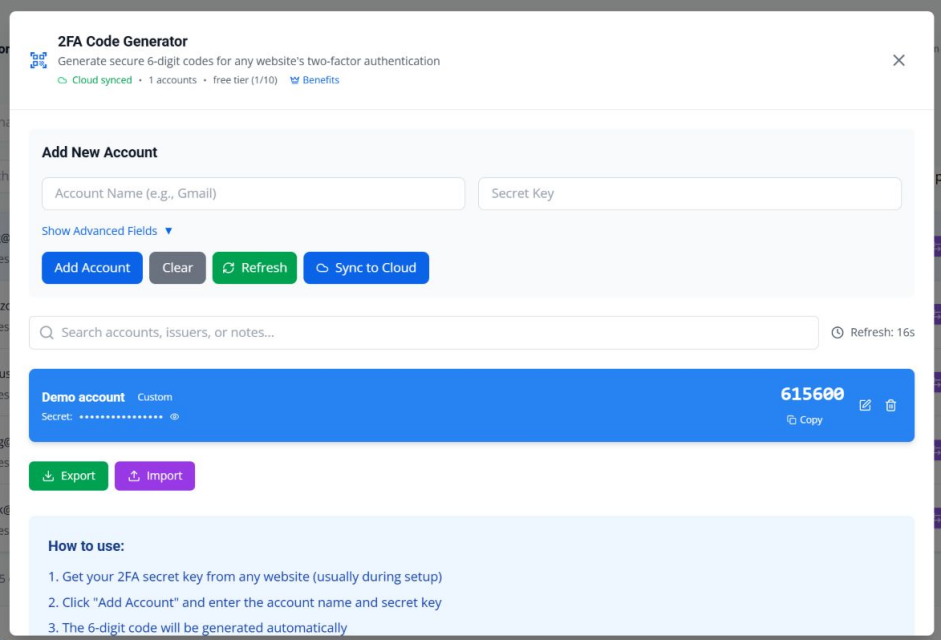
The built-in authenticator: add the secret once and it generates the code, with cloud sync limits by plan
5. Register through the exit and keep the session stable. Fill the form, take the code, verify, and let the first login happen through the same exit. Do not switch regions in the middle of the flow. A session that hops countries between step two and step five is the exact pattern the checks are built to catch.
6. Write the context onto the inbox itself. Every mailbox takes a private note. Put the client name, the platform, the plan you signed up for and the exit region in it while the details are fresh. This is the step everyone skips and everyone regrets.
Clear Step-by-Step Proxy IP Tutorials
Master proxy setup, integration and performance optimization quickly with IPFLY guides
Keeping fifty accounts alive, not five
The jump from a handful of accounts to a fleet is where discipline stops being enough.
Everything lives in one dashboard, so you are not keeping a spreadsheet in sync with six browser windows. Each inbox shows its expiry, and the smart preview shows the contents at a glance, which matters when the only thing you want is the one email with a code in it.
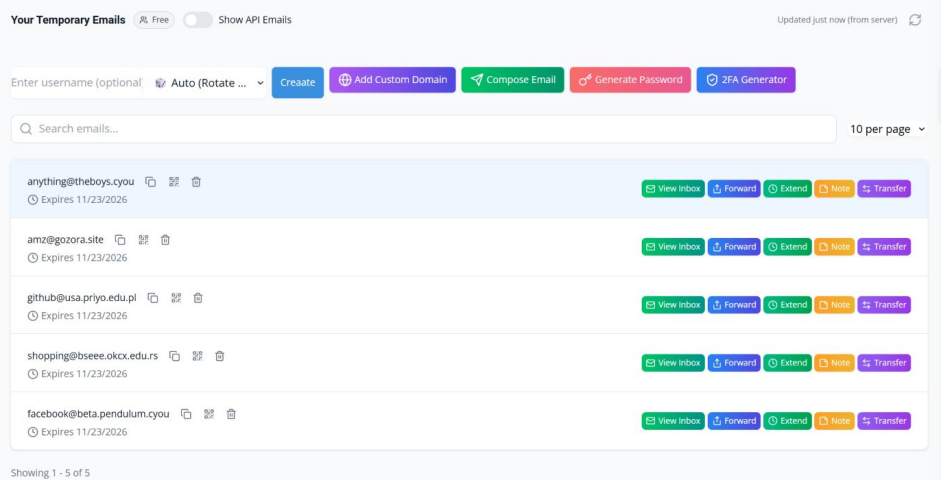
A dashboard full of inboxes, each with its own expiry: the fleet view
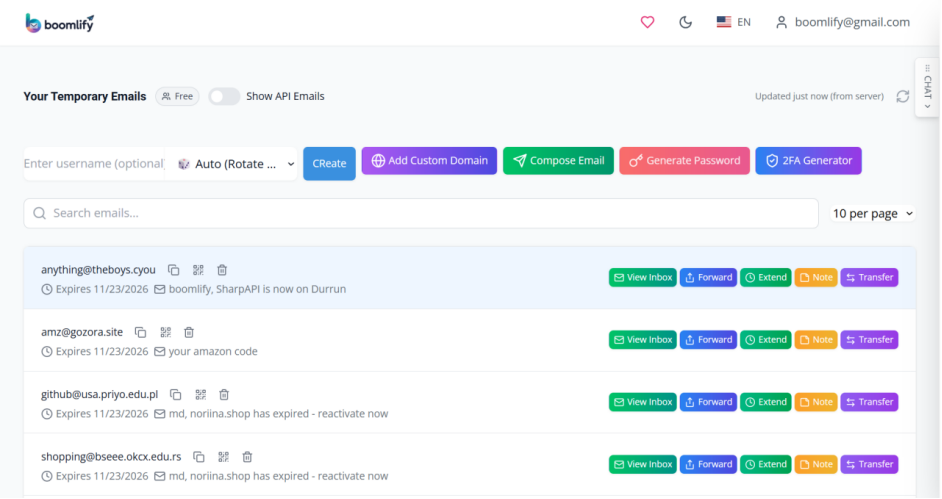
The preview panel: check the important mail without opening each inbox one by one
Two habits keep a fleet from rotting. The first is a renewal rhythm: free inboxes last 60 days, so an account you plan to keep needs its expiry extended before it lapses, and bulk select makes extending a batch a single action. The second is forwarding: enable Telegram delivery on anything time-sensitive and the verification codes arrive where you already are, instead of waiting in a tab you forgot to open.
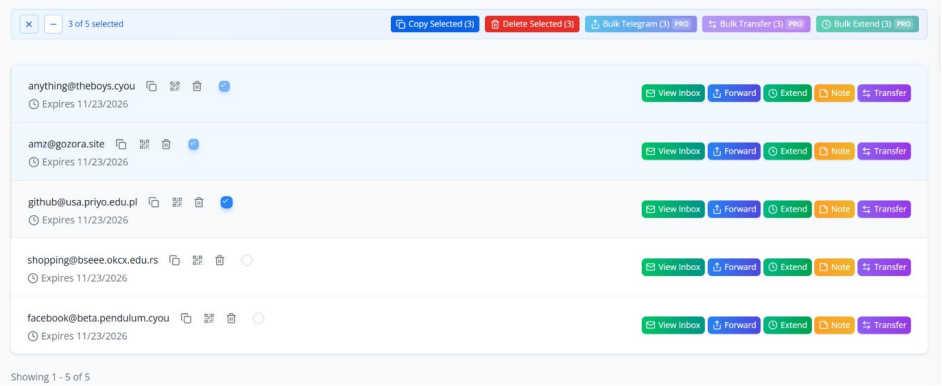
Bulk actions: select many inboxes and extend, forward or transfer them in one go
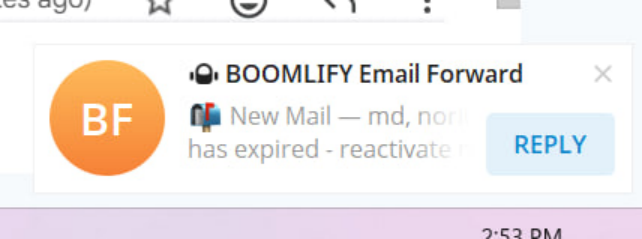
A forwarded message arriving as a Telegram notification
When the fleet gets big enough that you want software to manage it, the temp mail API takes over. Listing mailboxes and reading mail are free; only creating mailboxes costs credits, and reading is what a monitoring script does thousands of times a day.
The validity ladder below is the renewal clock in one picture: 60 days on the free plan, up through 90, 120, 150 and 240, to 365 days on the top plan. Inboxes created through the web app always carry an expiry date, and the API is where longer lifetimes live.
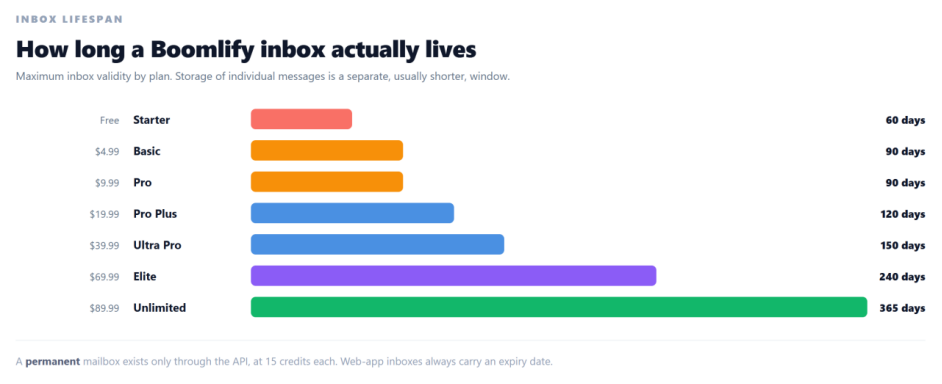
Maximum inbox validity by plan, from 60 days on the free tier to 365 on the top one
If part of the fleet is client work, custom domain temp mail puts those mailboxes on a domain you control. The addresses look like infrastructure you own rather than a shared domain, the domains are a paid-tier feature, and moving a client in or out is a bulk action instead of an afternoon of manual work.
Where this falls apart
If you lose the password, nobody recovers it for you. There is no phone number behind a temp address and no support desk that can prove it is yours. The inbox is a recovery tool, not a recovery service. Treat the password record as the one thing that must never be lost.
Free validity is 60 days, and that is an appointment, not a setting. If you plan to keep an account longer, either extend on a schedule or move the mailboxes that matter to a paid tier. An expired inbox does not warn the platform, and it does not warn you either.
The email layer cannot outvote a bad exit. If your proxy pool is a shared datacenter range, the account gets flagged at signup and no amount of inbox hygiene fixes it. Quality exits are not the optional half of this setup.
Team work hits plan ceilings. Local storage for codes is unlimited everywhere, but syncing 2FA codes across devices is capped by tier, from 10 accounts on the free plan upward. The ceilings are on the pro features page; check them before you standardize on this as shared infrastructure.
And the standing rule. None of this belongs anywhere near banking, government services, or anything you would hate to lose. The point of a recoverable account is keeping it out of situations that cannot survive a loss.
Pros and cons in one place
Pros
- The recovery path survives: the address that received the original verification still exists months later
- Password, 2FA codes and the mailbox live in one place, so one account is one screen
- The free tier covers small fleets: 150 mailboxes, 50 new per day, 60-day validity
- Bulk actions handle the boring parts: extend, forward or transfer a batch in one go
- Telegram delivery means verification codes reach you without opening a dashboard
- API reads and listings are free, so monitoring scripts cost almost nothing to run
Cons
- Passwords are stored locally in the browser, so losing that local store loses them
- 60 days of free validity is shorter than a long-lived account needs, and renewal is on you
- 2FA cloud sync has plan ceilings even though local storage is unlimited
- None of it rescues an account whose proxy exit was wrong on day one
Frequently asked questions
Does a temporary email address have a password?
Usually not. The address is just an address; there is nothing to log into. What needs credentials is the account you created with it. Boomlify lets you start as a guest and link the inbox to an account later, which is the moment the mailbox stops being a one-off and becomes something you can find again.
Can I still open a temp inbox weeks later?
Yes, within its validity: 60 days on the free plan, up to 365 days on the top tier. Message storage is a separate and usually shorter window, 14 days on the free plan, so download anything you need to keep. If the account is a keeper, plan the inbox around the same timeline.
How is this different from a password manager?
A password manager stores the password and stops there. It cannot receive the platform’s re-verification email, and that email is the piece that decides whether a locked account comes back. This setup stores the password and keeps the receiving address alive in the same place, which is the difference between a credential and a record.
Do I need a different proxy for every account?
For accounts you intend to keep, yes: one stable exit per account. Cycling one rotating pool across five accounts is a fast way to have all five linked together in the platform’s eyes. For read-only scraping, rotation is fine and often better.
What happens to the account when the inbox lapses?
Nothing at first. The account keeps working with its password. Then one day the platform sends a security check, a confirmation or a reset link, and there is nowhere for it to arrive. At that point you do not have a slow account, you have a locked one.
Can I hand the whole record to a teammate or a client?
Inboxes transfer between Boomlify accounts one at a time or hundreds at once, with a transfer history, which is the cleanest hand-off this kind of work has.
Is it safe to keep account passwords next to the inboxes?
For test, research and marketing accounts, yes: passwords are stored locally and not uploaded, and the record stays in one place. For anything financial or personal, no. That line should not move, no matter how convenient the dashboard gets.
The short version
An account created through a proxy is a record with five fields, and the mailbox is the field that decides whether the record can be recovered. Keep the exit stable, keep the inbox alive, and keep the password and the 2FA codes beside the address they belong to, and the platform’s routine questions stop being emergencies.
Boomlify does that in one place: mailboxes that live for months, a password generator, an authenticator, notes and bulk tools, with a free tier that is genuinely usable. One mailbox, one exit, one record. That is the whole trick.






