

Checking a few product pages by hand is manageable. Tracking prices, stock levels, or new job listings every day is a different task. You need a repeatable way to move through the results, collect the same fields, and check whether anything was missed.
List crawls provide that process. They turn website listings into structured records that you can compare, store, and update. As the workload grows, the challenge shifts from downloading pages to keeping the whole collection process reliable.
This guide covers what list crawls do, when they are useful, and how to build a workflow that can grow—from a small Python example to scheduling, data checks, and IPFLY proxy integration.
What Are List Crawls?
List crawls are automated collection jobs that move through website listings and extract repeated records. A crawler might visit each page of a product category, collect every product’s title and URL, and save the results in a table. The same approach applies to job boards and business directories.
Here, the term refers to collecting listing data. Some SEO tools also use “list crawl” to describe auditing a supplied set of URLs, which is a separate task.
The Pages and Records a List Crawler Targets
A list page contains repeated items with a shared structure. Each item becomes a record, while its properties become fields.
For example, a product card might provide:
- Product name and detail-page URL.
- Listed price and currency.
- Availability text.
- Rating or review count.
The list page may not contain everything you need. Specifications, full descriptions, or delivery terms may appear only on detail pages. Decide which fields matter before adding those extra requests.
A useful record also includes its source page and collection time. These fields help explain where a value came from and when it was observed.
List Crawling, Web Crawling, and Web Scraping
These activities overlap, but they describe different parts of the work.
| Activity | Main task | Typical result |
| Web crawling | Discover and visit URLs | A collection of pages or URLs |
| Web scraping | Extract information from page content | Selected fields or text |
| List crawling | Traverse listings and collect repeated items | Consistently structured records |
A list crawler can combine all three: discover the next page, download it, and extract its records. Keeping these responsibilities separate makes failures easier to locate.
Why Use List Crawls for Recurring Data Collection?
The value comes from repeated observations. A single collection run shows what was visible at one point. Scheduled runs help reveal what changed.
Track Changes Across Products, Jobs, and Directories
Consider an illustrative price-monitoring project. Collecting product names and prices once creates a snapshot. Collecting them on a schedule, with stable product identifiers, lets you compare observations over time.
The same pattern supports other tasks:
| Source | Fields to collect | Question the data can answer |
| Product listings | Product ID, price, availability | Which products changed price? |
| Job boards | Job ID, employer, location, posting date | Which roles appeared recently? |
| Business directories | Listing ID, category, website | Which entries are new or updated? |
Turn Listings into Data for Reports and Decisions
Consistent records are easier to use than saved screenshots or copied page text. They can feed spreadsheets, reporting systems, or alerts.
Define a field contract before collection. For example, decide whether an unavailable price becomes a blank value, whether dates use UTC, and whether availability is stored as raw text or a normalized category.
Preserve the original value when a conversion could lose meaning. Keeping both price_raw and a parsed numeric amount makes later checks easier.
Decide When Automated Collection Is Worth Maintaining
A custom crawler makes sense when you need repeated access, clear field control, and a workflow you can maintain.
First check whether an official export, licensed dataset, or authorized API already provides the required information. Building a crawler adds ongoing work: page changes, failed requests, storage, and monitoring.
For a small, one-time task, manual collection or an export may be enough. For a recurring task, compare the full maintenance cost with the value of current data.
Choose a Collection Method That Fits the Website
Inspect a representative page before choosing a framework. Your method should follow how the website supplies its records.
Locate the Data and Pagination Signals
Check the original HTML response first. If the required fields are already present, a direct HTTP request may be sufficient.
If records appear only after interaction, inspect the browser’s network activity. Determine whether the website uses an available data interface or requires browser rendering. Confirm the access conditions before using an endpoint.
Then identify how the list continues:
- A link to the next page.
- A page number or offset.
- A cursor returned with each batch.
- A button that loads more records.
- A scroll action that requests another batch.
Keep filters, sort order, and regional settings consistent. Otherwise, later pages may describe a different result set.
Match the Tool to the Page Behavior
| Approach | Suitable starting point | Main tradeoff |
| Requests + BeautifulSoup | Records present in HTML | You implement pagination and job control |
| Scrapy | Repeated HTTP collection across many pages | Requires framework setup and maintenance |
| Playwright | Browser interaction or rendering is required | Uses more computing resources |
| Managed collection service | Reduced infrastructure maintenance | Adds service costs and provider constraints |
For background on parsing and request handling, IPFLY’s Python collection tutorial introduces the basic building blocks.
Start with the simplest method that returns the required data. Add browser automation when the page behavior requires it.
Build Your First List Crawl in Python
The example below uses Books to Scrape, a practice website. It follows next-page links and writes records to a JSON Lines file, where each line contains one JSON object.
This is a teaching example for that site’s structure. It does not include production scheduling or recovery.
Define Your Starting URLs and Output Fields
Install the dependencies:
python -m pip install requests beautifulsoup4Save the following example as list_crawl.py. It collects a title, detail URL, raw price, source page, and observation time.
The detail URL serves as the example’s record key. On a production source, use a stable source ID when available.
Extract and Verify a Single Page
The parser checks that product cards exist and that each card has a title link and price. An unexpected page raises an error rather than becoming a successful empty result.
Follow Pagination and Save the Results
import json
import time
from datetime import datetime, timezone
from urllib.parse import urljoin, urlparse

import requests
from bs4 import BeautifulSoup

START_URL = "https://books.toscrape.com/"
MAX_PAGES = 3  # A small trial, not a full-site run.


def parse_page(html, page_url):
    soup = BeautifulSoup(html, "html.parser")
    cards = soup.select("article.product_pod")

    if not cards:
        raise ValueError("Expected product cards were not found")

    records = []
    for card in cards:
        link = card.select_one("h3 a")
        price = card.select_one(".price_color")

        if link is None or not link.get("href") or price is None:
            raise ValueError("A product is missing required elements")

        records.append({
            "title": link.get("title") or link.get_text(strip=True),
            "url": urljoin(page_url, link["href"]),
            "price_raw": price.get_text(strip=True),
            "source_page": page_url,
            "observed_at": datetime.now(timezone.utc).isoformat(),
        })

    next_link = soup.select_one("li.next a")
    next_url = (
        urljoin(page_url, next_link["href"])
        if next_link is not None and next_link.get("href")
        else None
    )
    return records, next_url


def main():
    page_url = START_URL
    visited = set()
    seen_records = set()
    pages = 0
    saved = 0
    reason = "page_limit"
    allowed_host = urlparse(START_URL).netloc

    with requests.Session() as session, open(
        "books.jsonl", "w", encoding="utf-8"
    ) as output:
        session.headers["User-Agent"] = "ListCrawlLearningExample/1.0"

        while page_url and pages < MAX_PAGES:
            if page_url in visited:
                raise RuntimeError("Repeated pagination URL")
            if urlparse(page_url).netloc != allowed_host:
                raise RuntimeError("Pagination left the allowed host")

            response = session.get(page_url, timeout=(10, 30))
            response.raise_for_status()
            records, next_url = parse_page(
                response.content, response.url
            )

            for record in records:
                if record["url"] not in seen_records:
                    output.write(
                        json.dumps(record, ensure_ascii=False) + "\n"
                    )
                    seen_records.add(record["url"])
                    saved += 1

            output.flush()
            visited.add(page_url)
            pages += 1
            page_url = next_url

            if page_url is None:
                reason = "end_of_list"
                break

            if pages < MAX_PAGES:
                time.sleep(2)

    print({
        "pages_processed": pages,
        "unique_records_saved": saved,
        "stop_reason": reason,
    })


if __name__ == "__main__":
    main()
Run it with:
python list_crawl.pyInspect the saved records before increasing MAX_PAGES. Check several titles, links, and prices against the source pages.
The summary distinguishes a deliberate page limit from reaching the end of the list. A request or parsing error stops the script with an exception; it does not print a successful completion summary. Records already written remain available, although running the script again overwrites the file.
The two-second delay is a conservative choice for this small demonstration, not a universal rate recommendation.
Clear Step-by-Step Proxy IP Tutorials
Master proxy setup, integration and performance optimization quickly with IPFLY guides
Design a Workflow That Can Grow
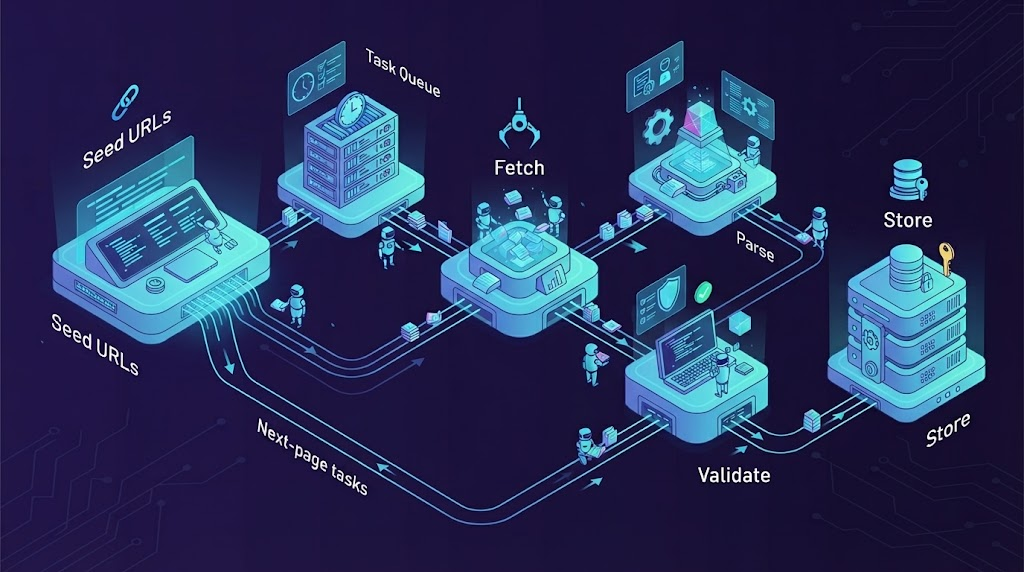
Once the basic parser works, improve how tasks move through the system.
Separate the Queue, Fetching, and Parsing Stages
A larger workflow benefits from clear stages:
Seed URLs → Task Queue → Fetch → Parse → Validate → Store
                ↑                  │
                └── Next-page tasks┘
The queue tracks work. Fetching handles network responses. Parsing turns the expected page into records. Validation decides whether those records meet the data contract.
Keep list-page tasks separate from detail-page tasks. This makes it possible to change their priorities or retry rules independently.
Control Request Load and Recover Failed Tasks
Apply limits per website across all workers. Increasing workers without a shared limit can create more traffic than intended.
Use bounded retries for temporary failures. Respect a Retry-After response when supplied. An access-denied response needs investigation; repeatedly retrying it may add load without fixing the cause.
Persist pending tasks and completed work. Save a task’s completion state only after its output has been stored safely. Stable record keys help prevent duplicates if a worker repeats a task after a crash.
Scrapy offers disk-backed request scheduling and duplicate filtering through its job persistence features. Its job documentation also explains the conditions and limits of resuming a crawl.
Schedule Updates Around Data Freshness
Choose a schedule based on how quickly the data becomes useful or outdated.
Separate the time you observed a record from any publication or update date shown by the source. They describe different events.
Avoid overlapping scheduled runs unless the system can coordinate them. A slow job should not silently trigger another full job against the same pages.
Use IPFLY to Support Your Crawl’s Network Requirements
Small collection jobs may work without a proxy. A proxy becomes relevant when the workflow needs a specific network location, a dedicated outbound address, or controlled changes between independent requests.
As checked on October 21, 2026, IPFLY’s official website advertises more than 90 million residential IP addresses and coverage across 190+ countries and regions. These are provider-reported network figures. They do not establish the number of addresses available in a particular city or the success rate against your target.
Choose an IPFLY Proxy Type for Your Workload
| Requirement | IPFLY option to evaluate | Check before scaling |
| Regional observations with configurable address changes | Rotating residential proxies | Required location, session controls, and traffic allowance |
| A dedicated, stable outbound address | ISP proxies | Location availability and address continuity conditions |
| Fixed endpoints for throughput-focused collection | Dedicated datacenter proxies | Target compatibility and measured workload cost |
IPFLY’s ISP proxy page lists dedicated static addresses and HTTP(S)/SOCKS5 support. Its datacenter proxy page also lists dedicated IPs and these protocols.
These options address different network needs. A static page does not automatically require datacenter proxies, and a dynamic page does not automatically require residential proxies.
Before selecting a residential setup, review the practical configuration concepts in IPFLY’s guide to using residential proxies. Confirm current plan details and available locations in your account.
Connect IPFLY to Your Python Crawler
Copy the proxy URL generated for your account. Store it in an environment variable named IPFLY_PROXY_URL, keeping credentials out of shared source files.
In the earlier script, add this import:
import osThen replace its session.get(...) call with:
proxy_url = os.environ["IPFLY_PROXY_URL"]

response = session.get(
    page_url,
    proxies={
        "http": proxy_url,
        "https": proxy_url,
    },
    timeout=(10, 30),
)
Use the endpoint, port, protocol, and credentials supplied by IPFLY. This example does not assume a universal gateway address or authentication format.
The dictionary keys identify the destination URL scheme. The proxy URL’s own scheme identifies the connection to the proxy. Requests explains these settings in its official proxy documentation. Keep TLS verification enabled.
Match Session Behavior to the Target Website
Some tasks are independent. Others depend on cookies, a cursor, or a server-side session carried across several requests.
For a stateful sequence, keep the required session settings consistent. Changing the outbound address between pages may disrupt that sequence on some websites.
IPFLY describes per-request and sticky-session options in its overview of rotation and session controls. A sticky session is temporary address persistence, not a permanent static IP.
Define the logical task first, then choose when an address change is appropriate. IPFLY’s discussion of rotation strategies provides additional context for separating independent requests from session-based work.
Evaluate Results Before Increasing Volume
Use the same target URLs, fields, and request limits when comparing configurations. Measure:
- Valid unique records collected.
- Request errors by type.
- Response time and bytes transferred.
- Total collection cost.
A useful cost measure is:
Cost per valid unique record = total measured run cost ÷ valid unique records
Include browser or service costs where relevant. A configuration with a lower advertised unit price may still cost more if it produces more failed or unusable results.
IPFLY’s guide to evaluating proxy network limits is relevant when reviewing capacity claims. In practice, bandwidth, transferred data, concurrency, and request count are separate measures. A provider’s connection capacity also does not remove a target website’s traffic limits.
Validate the Data Before Using It
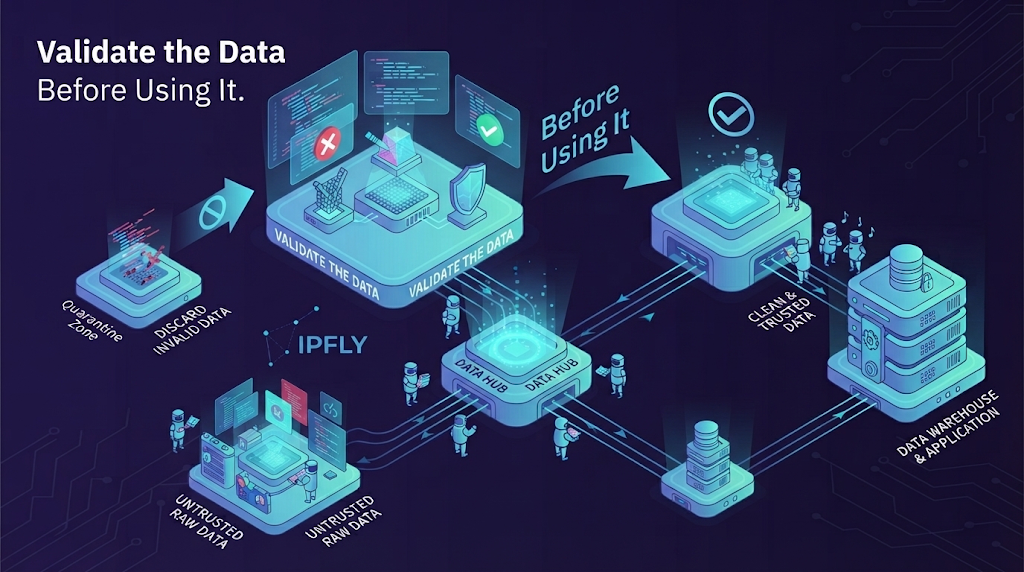
A completed job means the workflow finished its planned tasks. Data acceptance requires separate checks.
Normalize Fields and Remove Duplicate Records
Convert fields using source-aware rules. Preserve currencies, units, and date context rather than stripping them away.
Use decimal values or integer minor units for money when exact arithmetic matters. Keep raw text alongside parsed values when the format may vary.
Deduplicate within the correct scope. A product ID may identify one product, but that product’s price in two regions represents two observations. A suitable observation key might include the source ID, region, and run ID.
Check Coverage and Track Changes Across Runs
Review record counts, field completeness, duplicate rates, and unresolved failures together.
For an illustrative run, suppose a listing reports 500 results but the crawler saves 420 unique records. That difference is a reason to investigate pagination, filters, failed pages, and the meaning of the displayed total. It is not proof that exactly 80 records were missed.
Track new and changed records across accepted runs. Treat a missing record as “not observed in this run” until the collection coverage is strong enough to support a removal decision.
Troubleshoot Common List Crawl Failures
Use the evidence below to choose the next check.
| Symptom | Evidence to inspect | Next action |
| Only the first page is collected | Next-page link or background request | Confirm that the continuation state advances |
| Different pages return the same records | Requested URL, cursor, and returned IDs | Check reused parameters and session state |
| A successful response has no expected fields | Content type and saved response sample | Confirm that the response is the intended list page |
| Proxy authentication fails | Proxy status and generated credentials | Check the endpoint and authentication settings |
| Requests are rate-limited | Status, headers, and aggregate request rate | Slow or pause the job and honor retry instructions |
| Record count drops suddenly | Failed tasks and field-fill rates | Compare page samples and retry only unresolved work |
| Results show the wrong regional context | Exit location, language, cookies, and filters | Align the relevant settings and repeat a small check |
Store diagnostic samples carefully. Remove credentials and sensitive data before sharing logs.
Conclusion
Reliable list crawls start with a clear dataset and a verified single-page parser. Add pagination, recovery, and data checks before increasing volume. Where the workflow needs regional access or a controlled network exit, evaluate IPFLY with a small, measurable run and scale based on the quality and cost of the records collected.






