

Managing multiple social media accounts can quickly become complicated. Switching between physical devices, configuring different network connections, publishing content, and completing repetitive tasks can take significant time and resources.
TikSales combines AI automation technology with cloud-based real-device environments to simplify multi-account social media management. Together with proxy services such as IPFLY, TikSales provides a scalable workflow for managing TikTok, Instagram, and other social media accounts.
What Is TikSales?
What Is a Social Media Cloud Phone?
TikSales provides cloud-based Android phone environments that allow users to remotely access and manage multiple independent device environments from one platform.
Instead of maintaining a large number of physical smartphones, users can create and manage cloud phone environments according to their operational needs. Each environment can be used for social media apps, account management, content operations, and automated workflows.
This makes cloud phones particularly useful for agencies, marketers, creators, and businesses managing multiple social media accounts.
Key Features of TikSales
Secure Real-Device Environments
TikSales provides high-quality cloud phone environments designed to provide independent and stable device environments for social media operations.
Multi-Account Management
Manage multiple accounts from one centralized platform. Users can organize devices into groups, assign tasks, and monitor account and device status.
AI-Powered Automation
TikSales automates repetitive workflows such as account login, account warming, daily engagement, profile maintenance, content publishing, and account monitoring.
AIGC Content Creation Assistant
AI-powered tools help users generate content ideas, optimize scripts, develop publishing strategies, and explore content opportunities.
These features allow teams to reduce repetitive manual work and manage large account portfolios more efficiently.
Why Use Cloud Phones for Multi-Account Social Media Management?
The Limitations of Physical Devices
Managing multiple accounts with physical smartphones can become increasingly difficult as the number of accounts grows.
Teams may need to purchase and maintain numerous devices, manage different network connections, switch between phones, and manually perform repetitive operations. This increases both operational costs and management complexity.
How Cloud Phones Simplify Multi-Account Operations
Cloud phones move device management into a centralized cloud environment.
With TikSales, users can create multiple Android environments, access them remotely, organize devices into groups, and execute automation tasks from a single platform.
This provides a more flexible way to scale social media operations without having to maintain a large collection of physical devices.
How to Get Started with TikSales
Step 1. Create a TikSales Account
Visit TikSales and create an account.
After registration, you can access the TikSales cloud phone platform and begin setting up your social media environments.
Step 2. Create a Cloud Phone Environment
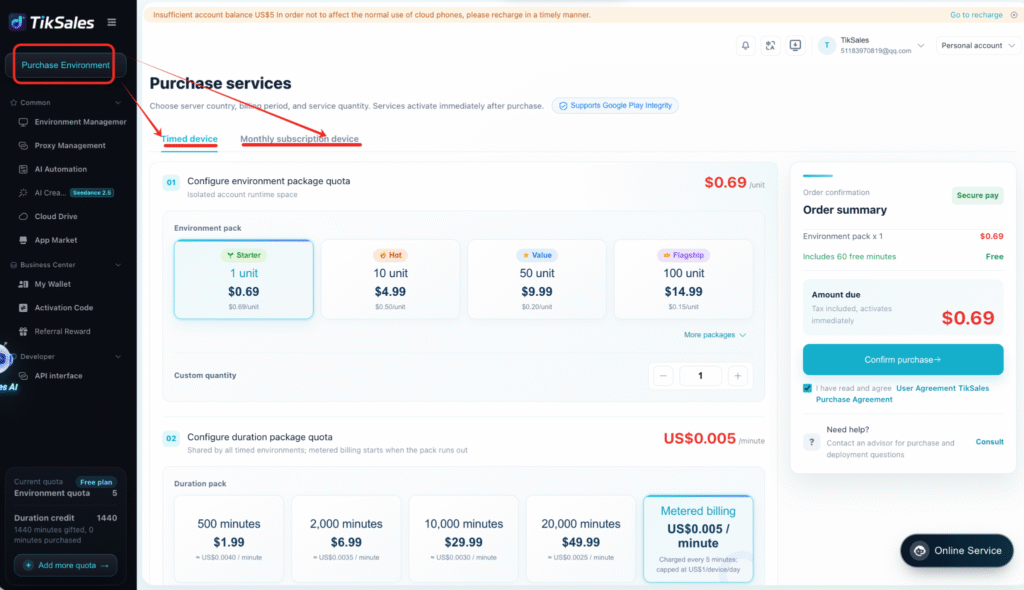
TikSales provides free trial options for new users, allowing you to test both timed devices and monthly devices.
Choose the device type that fits your needs, create your cloud phone environment, and access it remotely through TikSales.
You can then install and log in to your social media applications, such as TikTok and Instagram.
Step 3. Configure Your Proxy with IPFLY
For multi-account operations, network configuration is an important part of the setup.
IPFLY provides proxy solutions that can be configured with TikSales cloud phone environments.
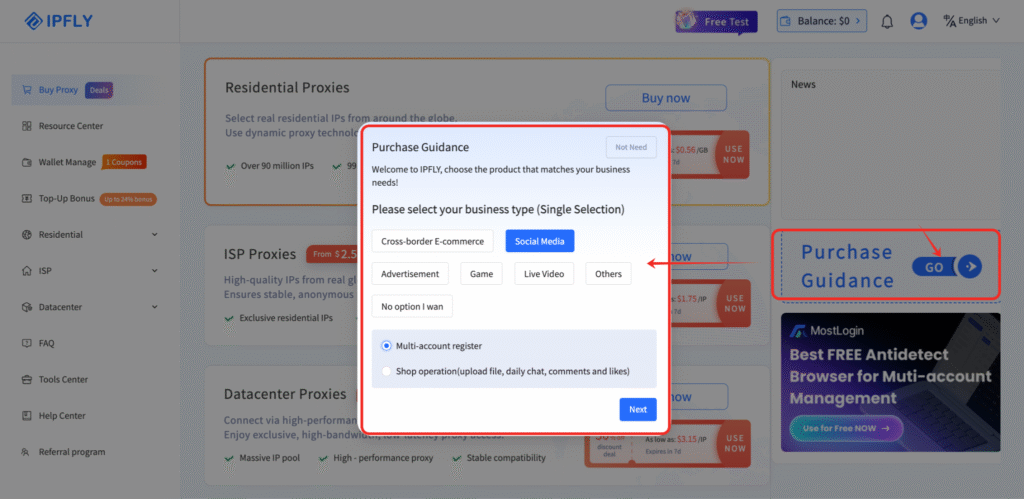
(1) Find the right proxy with IPFLY’s Purchase Guidance
IPFLY offers a questionnaire-based Purchase Guidance that helps you identify the proxy solution that best fits your needs. Simply answer a few questions about your use case, requirements, and network preferences to get a suitable proxy recommendation.
(2) Add and bind your proxy in TikSales
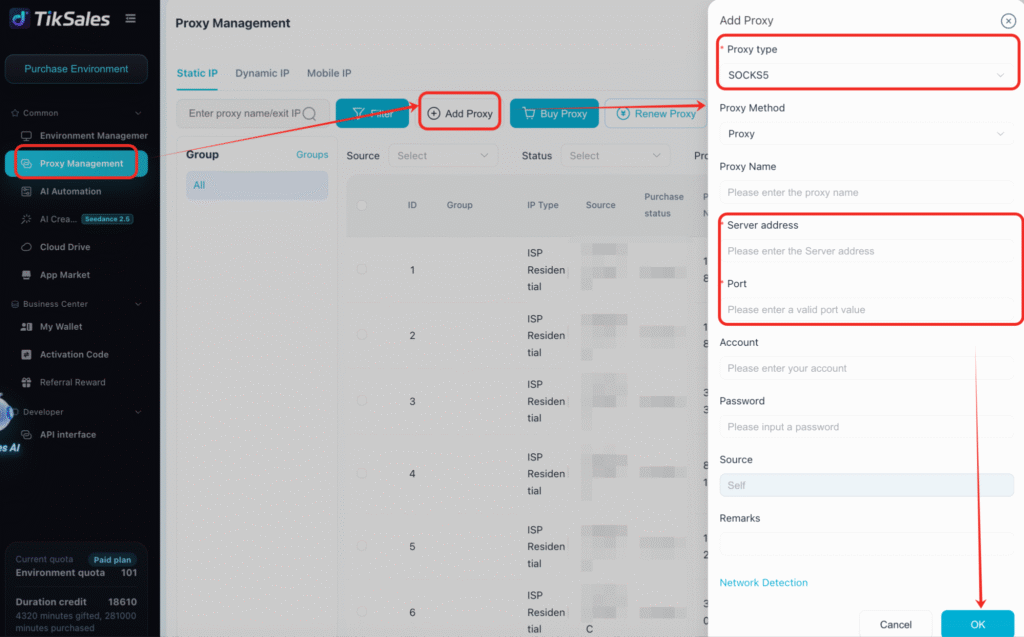
After purchasing a proxy from IPFLY, export the IP information from IPFLY. Then, in the Proxy Management section of your TikSales environment, click 【Add Proxy】, enter the corresponding proxy information, and click 【One-Click Check】 to verify the connection. Once the proxy passes the check, bind it to the desired cloud phone environment to complete the network configuration.
Full-Industry Proxy IP Application Solutions
Power scalable growth for every cross-border business scenario with IPFLY’s reliable global proxy network
Step 4. Execute AI Automation Templates
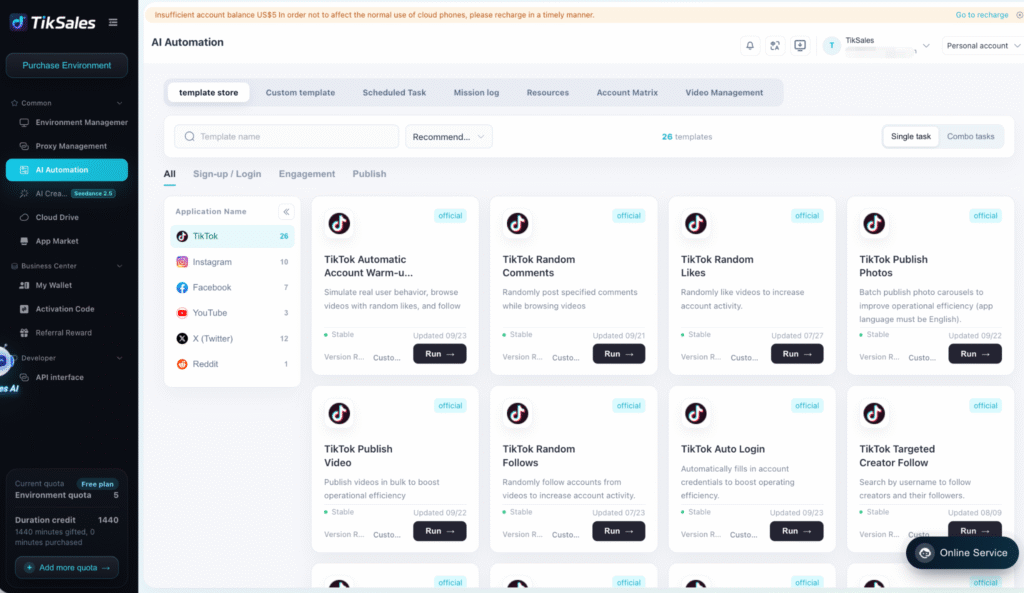
Once your cloud phone and network configuration are ready, you can use TikSales automation templates to simplify repetitive social media tasks.
Select the required accounts or device groups, choose an automation template, configure the necessary parameters, and execute the task.
How to Use IPFLY Proxies with TikSales
Step 1. Choose a Proxy
Visit IPFLY and choose a proxy solution based on your target market and operational requirements.
Step 2. Get Your Proxy Details
After purchasing or obtaining a proxy, collect the required connection information, such as the proxy host, port, username, and password.
Step 3. Add the Proxy to TikSales
Open your TikSales cloud phone environment and enter the proxy information in the network configuration settings.
Step 4. Assign the Proxy to a Cloud Phone
Configure the selected proxy for the corresponding cloud phone environment. This allows your cloud phone to connect through the configured proxy.
Step 5. Start Managing Your Accounts
Once the environment and network configuration are complete, you canpower on and log in to your TikTok, Instagram, or other social media accounts and begin managing them through TikSales.
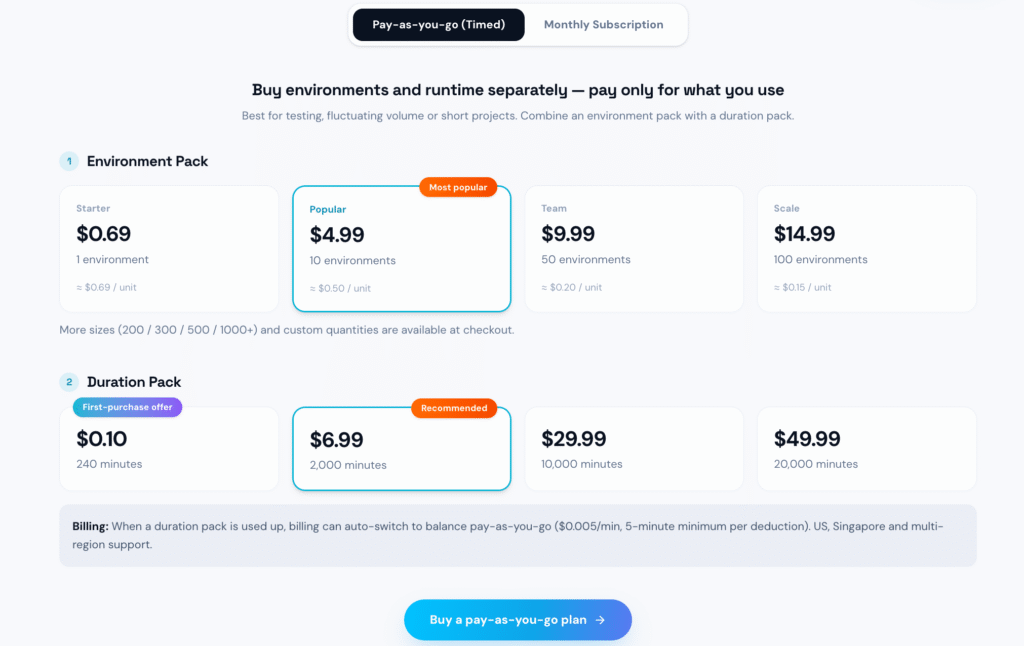
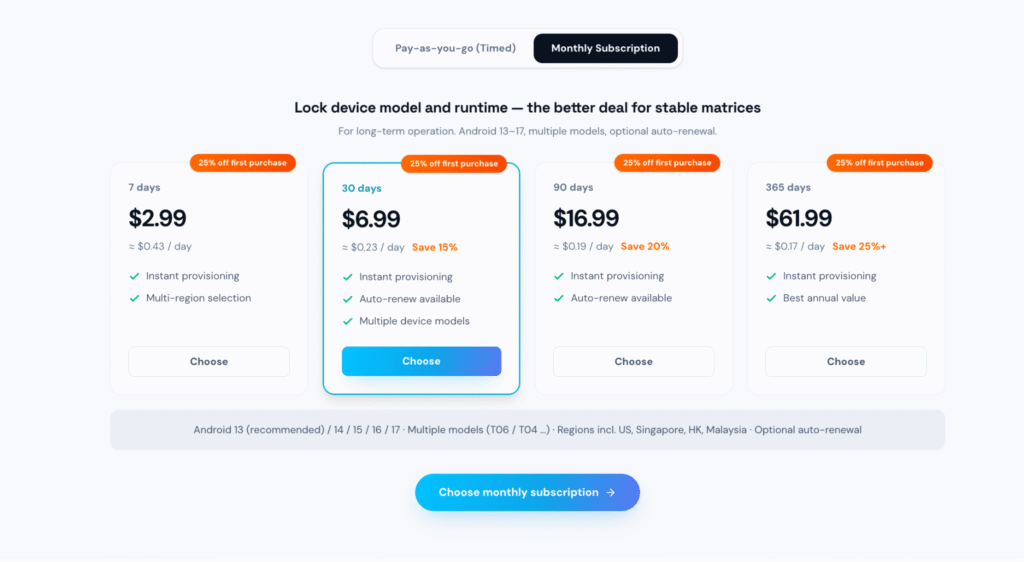
Price
TikSales offers flexible device options, including timed devices and monthly cloud phone plans, allowing users to choose a solution based on their usage and account management needs.
New users can also access free trial devices to test the platform before choosing a paid plan.
For the latest pricing and available plans, visit TikSales Pricing.
Pros and Cons of TikSales
Pros
- Centralized multi-device and account management
- Cloud-based Android environments
- AI-powered automation for repetitive workflows
- AIGC tools for content creation
- Flexible timed and monthly device options
- Scalable for agencies and multi-account teams
- Can be combined with proxy solutions such as IPFLY
Cons
- Initial setup may require some time for users unfamiliar with cloud phones and proxies
- Advanced automation and multi-account workflows may require configuration and testing
- Proxy costs are separate from cloud phone costs when using a third-party proxy provider
Who Can Benefit from TikSales + IPFLY?
Social Media Agencies
Manage multiple client accounts and cloud phone environments from one centralized platform.
Affiliate Marketers
Operate multiple social media accounts and streamline repetitive account and content workflows.
E-commerce Teams
Manage social media accounts for different products, brands, or markets.
Content Creators
Create and manage multiple accounts while reducing repetitive operational work.
Global Marketing Teams
Build flexible social media workflows for different markets and account portfolios.
Conclusion
Managing multiple TikTok and Instagram accounts does not have to mean maintaining dozens of physical smartphones.
TikSales provides the cloud phone environments, centralized account management, AI automation, and content assistance, while IPFLY provides proxy solutions for network configuration.
Together, TikSales and IPFLY can help businesses, agencies, marketers, and creators build a more scalable workflow for multi-account social media operations.
Ready to get started?






