

You open an Amazon product page or try to check out, but instead of the page you expect, you see “Sorry, something went wrong on our end.” The message does not explain what went wrong, leaving you unsure whether to wait or change something on your device.
This error can have several causes. Below, we’ll explain what the message means, walk through practical fixes, and cover what to check if you use a proxy for Amazon research or seller work.
What Does “Sorry, Something Went Wrong on Our End” Mean on Amazon?
Amazon’s “Sorry, something went wrong on our end” message means the page you requested could not load or complete the action. You may see it on a product page, in your cart, during checkout, or when opening an account page. Because the error page often features a photo of a dog, people also call it the “Amazon dog page.”
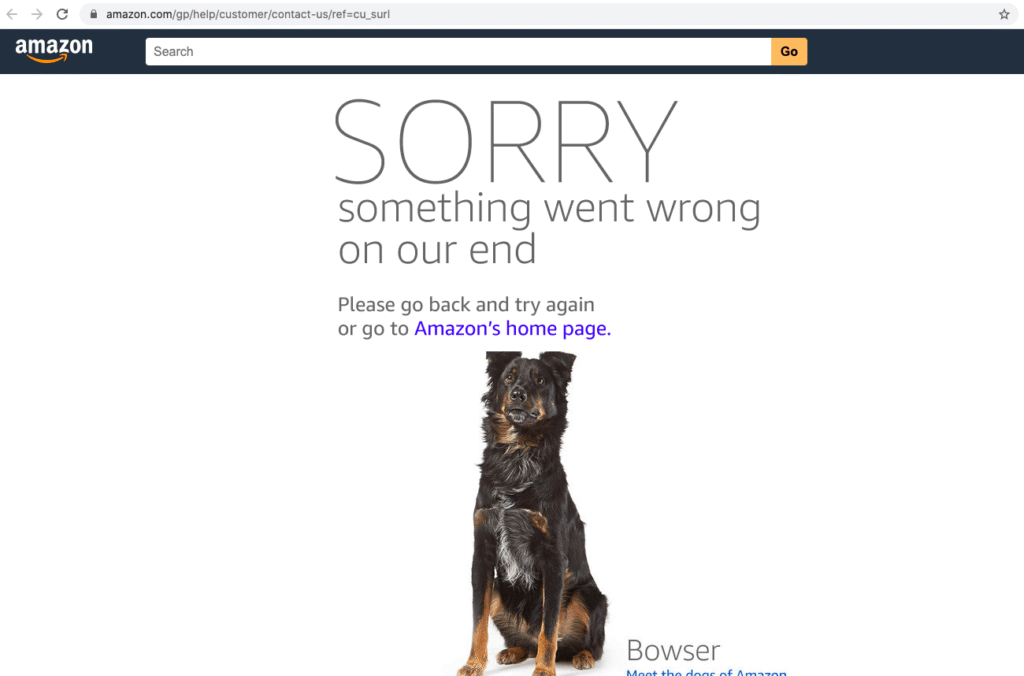
If Amazon keeps saying “Something went wrong on our end,” the message alone does not tell you what caused the problem. Amazon may be having a temporary issue, the link may no longer work, or something in your browser or connection may be interfering with the request. In some cases, access restrictions may also be involved. But the message by itself does not mean your IP address has been blocked.
Why Does Amazon Keep Saying “Something Went Wrong on Our End”?
The same Amazon error page can appear for different reasons. Understanding what might trigger it can help you narrow down the cause before trying a fix. These are the most common possibilities:
- A temporary Amazon issue. Amazon may be having trouble loading a page or processing an action, such as opening your cart or completing checkout. If the problem is on Amazon’s side, changing your browser settings may not help.
- A broken or outdated link. A product listing may have moved or become unavailable, or the URL may contain an error. In this case, one Amazon page might fail while the rest of the site works.
- Browser or sign-in session problems. Outdated cookies, cached data, or an expired session can interfere with how an Amazon page loads, particularly when you are signed in.
- A connection, VPN, or proxy issue. An unstable connection or a misconfigured VPN or proxy may prevent a request from reaching Amazon as expected. The error alone cannot tell you which part of the connection is responsible.
- Too many requests in a short time. If a tool repeatedly accesses Amazon pages, its request pattern may encounter access limits or security checks. This is more relevant to automated research than to ordinary shopping, and the “Sorry, something went wrong on our end” message does not confirm that a request limit was triggered.
How to Fix Amazon’s “Something Went Wrong on Our End” Error
If Amazon keeps saying “Something went wrong on our end,” start with the simplest checks. The message does not identify a single cause, so try these steps in order and stop when the page works again.
- Refresh the page and check the link
Reload the page once. If the error appears on a product page, go to Amazon’s homepage and search for the item instead of reopening the same link. If other pages load but that product page does not, the link or listing may be the problem.
- Give Amazon a few minutes
Try opening another Amazon page, or check the same page on a different device. If several pages fail across devices, the issue may be on Amazon’s side. Wait a few minutes before trying again, especially if the error appeared during checkout. Before placing an order again, check Your Orders to see whether the first attempt went through.
- Try a private window or another browser
Open Amazon in a private browsing window. If the page works there, something in your usual browser session may be interfering with it. You can also try another browser to see whether the problem is limited to the one you normally use.
- Clear Amazon’s site data
If Amazon works in a private window but fails in your regular browser, clear the cookies and cached site data for Amazon in your browser settings. Then reopen Amazon and sign in again. Clearing cookies will sign you out, so make sure you can access your account before doing this.
- Update the browser or Amazon Shopping app
If you use a browser, install any available update and restart it. If the error appears in the Amazon Shopping app, update the app through your device’s app store, then close and reopen it. If Amazon works in a browser but not in the app, the problem may be limited to the app.
- Compare your connections
If possible, try the same Amazon page on another connection, such as mobile data instead of Wi-Fi. If you use a VPN or proxy, check whether the error also appears without it. A page that works on one connection but fails on another points to a connection or configuration issue; it does not, by itself, prove that Amazon blocked an IP address.
- Contact Amazon if an account or order issue continues
If you still cannot access your account, complete checkout, or confirm whether an order was placed, contact Amazon Customer Service. Tell them which page showed the error, when it happened, and which steps you have already tried.
Still Getting the Amazon Error While Using a Proxy?
If Amazon keeps saying “Something went wrong on our end” while you use a proxy, first check whether the proxy connects at all. A proxy connection error and Amazon’s “Sorry, something went wrong on our end” page point to different stages of the request, so they call for different checks.
Full-Industry Proxy IP Application Solutions
Power scalable growth for every cross-border business scenario with IPFLY’s reliable global proxy network
Check the proxy connection first
Make sure the proxy host, port, username, and password match the details in your provider’s dashboard. If your browser or tool cannot connect through the proxy, you may be dealing with a proxy connection error. Check those settings before troubleshooting Amazon.
If the proxy connects and Amazon displays its error page, you still cannot tell from the message alone whether the proxy, your browser session, the page itself, or a temporary Amazon issue is responsible.
Compare the same Amazon page with and without the proxy
Open the same URL on the same Amazon country site using your usual connection, then try it through the proxy. If the page works directly but repeatedly fails through the proxy, review the proxy’s location and settings. If you see the error on both connections, changing proxies is unlikely to be the first useful step.
If you are signed in to Amazon, avoid switching IP addresses repeatedly while testing. Keeping the connection consistent makes it easier to see whether a particular change helped.
Match the proxy to your Amazon workflow
How you use Amazon matters when choosing a connection:
- For seller work that requires a continuing login, a consistent IP may be more useful than frequent rotation. IPFLY’s ISP proxies provide a stable connection for workflows where IP consistency matters.
- For research on publicly available Amazon pages in different regions, location selection and request volume matter more. IPFLY’s rotating residential proxies offer residential IPs across multiple regions. Keep request rates reasonable, and check whether an official data source meets your needs.
A proxy may help if the problem is specific to the connection you are using. It cannot fix a broken product link or an Amazon-wide outage. If Amazon keeps saying “Sorry, something went wrong on our end,” use the comparison above to narrow down the cause before changing your proxy setup.
How to Reduce Repeat Errors in Amazon Research Workflows
If you regularly check publicly available Amazon pages, a few habits can make recurring errors easier to diagnose:
- Record each failure. Note the URL, time, Amazon country site, connection used, and whether other pages loaded. If Amazon keeps saying “Something went wrong on our end,” these details can help you spot a pattern instead of treating every failed page as the same problem.
- Start small before increasing request volume. Test a limited number of pages first. If errors become more frequent as you run more requests at once, pause and review the workflow’s timing. Repeatedly retrying failed pages may add traffic without revealing the cause.
- Change one setting at a time. When comparing direct and proxy access, test the same page on the same Amazon country site. Keep the other settings consistent so you can tell which change, if any, affected the result.
- Separate page failures from connection failures. Check whether the tool can reach other pages through the same connection. A failed connection calls for different troubleshooting than an Amazon page displaying “Sorry, something went wrong on our end.”
These steps can help you investigate repeat errors, but they cannot guarantee uninterrupted access. Follow Amazon’s applicable terms and use an official data source when one is available for your research.
Conclusion
If Amazon keeps saying “Something went wrong on our end,” start with the page itself, then check your browser and connection. The message has several possible causes and does not, on its own, mean your account or IP address has been blocked.
If you already use a proxy for Amazon research or seller work, check that it connects properly and choose a setup that fits the task. If you find your proxy not working, explore the IPFLY proxy option that matches your needs.
Frequently Asked Questions
Why do I keep getting “Sorry, something went wrong on our end” on Amazon?
The message can appear when Amazon cannot load a page or complete an action. Possible causes include a temporary Amazon issue, a broken link, a browser session problem, or a connection issue. The message alone does not identify which one is responsible.
Does this Amazon error mean my IP address is blocked?
No. Amazon’s “Sorry, something went wrong on our end” page is not proof that your IP address has been blocked. If the error appears only on one connection, compare the same page on another connection to help narrow down the cause.
Why does Amazon work on my phone but not my computer?
Your phone and computer may use different browsers, saved site data, apps, or network connections. If Amazon works on one device, try a private window on the other. You can then check whether the issue is tied to its browser session or connection.
Can a proxy fix Amazon’s “Something went wrong” error?
A proxy may help only if the issue is specific to your current connection. It will not fix a broken product link or an Amazon-wide problem. If you already use a proxy, check that it connects correctly and compare the same Amazon page with and without it before changing your setup.
What should I do if the error appears during checkout?
Before trying to place the order again, check Your Orders to see whether it was submitted. If no order appears, wait briefly and retry checkout. If the error continues or you cannot confirm the order’s status, contact Amazon Customer Service.






