

Managing several online accounts or projects is not simply a matter of opening more browser tabs. Cookies, saved sessions, browser settings, extensions, and network connections can quickly become difficult to organize when everything runs inside the same environment.
This is where dedicated browser profile management software becomes useful. Instead of treating the browser as one shared workspace, users can create separate environments for different accounts, projects, or operational tasks.
Hidemyacc takes this approach by combining browser profile management with fingerprint configuration, proxy integration, collaboration tools, and automation features.
Rather than focusing on a single feature, this review looks at how the different parts of Hidemyacc fit together. We examine its profile-management capabilities, fingerprint controls, proxy workflow, pricing structure, team features, and practical setup with an IPFLY residential proxy.
The goal is to provide a clear overview of where Hidemyacc fits into modern browser-based workflows and what users should evaluate before adopting it for their own operations.Readers looking for a broader antidetect browser comparison can also evaluate how it differs from other leading solutions before choosing a platform.
1. What Is Hidemyacc?
Hidemyacc is an anti-detect browser and browser profile management platform designed to help users create and manage separate browsing environments on the same device.
Instead of running multiple accounts inside one conventional browser environment, users can create independent profiles with their own cookies, browsing data, browser configurations, and fingerprint-related parameters. This makes it easier to keep different projects and account sessions organized without mixing browser data.
Hidemyacc is built around several connected parts of the browser workflow. The first is the browser profile itself, which acts as an independent workspace for a specific account or project. The second is fingerprint configuration, which allows users to manage browser and device-related parameters within that environment. The third is proxy integration, which provides the network connection assigned to the profile.
These components address different parts of the same workflow. A browser profile manages the local environment and stored browsing data, while the proxy controls the network path used to access websites.
Hidemyacc is designed for a range of professional use cases, including e-commerce operations, digital advertising, market research, social media management, web data collection, and agency-based browser workflows.
It is worth emphasizing that an anti-detect browser is not a universal privacy or anonymity solution. Websites can use many different signals and security systems, and no browser configuration can guarantee that an account will never be challenged, restricted, or reviewed.
2. Key Features of Hidemyacc
Hidemyacc’s main value comes from bringing several browser-management functions into the same workspace rather than requiring users to handle each part separately.
2.1 Browser Profile Management
Browser profiles are the foundation of the Hidemyacc workflow.
Each profile can maintain its own browsing environment, allowing users to keep cookies, cache, local storage, extensions, and session data separate between projects.
Hidemyacc provides tools for creating, duplicating, organizing, and managing browser profiles. Profile folders can also make it easier to organize environments when the number of profiles grows.
For a small operation, the main advantage is organization. Instead of remembering which browser window belongs to which project, users can give each environment a dedicated profile.
For larger teams, profile sharing, transfer, backup, and other management features become increasingly relevant because they allow browser environments to be handled as shared business resources rather than isolated local sessions.
2.2 Browser Fingerprint Customization
Browser fingerprint configuration is another major part of Hidemyacc.
A browser can expose a range of technical characteristics to websites, including information related to the user agent, operating system, screen configuration, language, timezone, graphics environment, and other browser properties.
Hidemyacc allows these parameters to be configured within individual browser profiles. It also provides automated profile-generation options so users do not have to manually adjust every setting when creating a new environment.
The practical benefit is greater control over how different browser profiles are configured. This can make it easier to maintain separate environments for different projects and keep those configurations organized over time.
At the same time, fingerprint configuration should not be treated as a guarantee against detection. Website security systems can evaluate many different signals, including network information and behavioral patterns.
2.3 Proxy Management
Proxy integration is another important part of the Hidemyacc workflow.
Users can assign a proxy directly to a browser profile rather than configuring the network separately every time the profile is launched.
This creates a clear separation between the browser environment and the network connection. A profile can maintain its own browser data and settings while using a designated proxy connection for network traffic.
Hidemyacc also provides proxy-management functionality for users who need to organize multiple network resources.
This is particularly relevant when the browser is being used alongside a dedicated proxy provider. In this setup, Hidemyacc manages the browser-side environment while the proxy provider handles the network connection.
2.4 Team Collaboration
Hidemyacc is not limited to individual browser management. Its team-oriented functionality is designed for organizations where multiple people need access to browser environments.
Supported plans include features such as profile sharing, profile transfer, sub-accounts, shared folders, and permission management.
This can simplify workflows for agencies, e-commerce teams, and other businesses where employees need to work with designated profiles.
Instead of sharing login credentials manually, teams can organize access around specific browser environments.
The exact collaboration features available depend on the subscription plan, so organizations with larger teams should review the available permissions, profile limits, and sharing options before choosing a plan.
2.5 Task Automation and Synchronization
Hidemyacc also includes automation-related features designed to reduce repetitive browser tasks.
Its workflow tools support recorded actions, imported scripts, and synchronization features on supported plans. These capabilities can be useful when similar actions need to be performed repeatedly across multiple browser profiles.
For example, a business may use automation for structured browser testing or repetitive administrative tasks that would otherwise require the same manual process across many environments.
Automation should always be used within the rules of the websites and services involved.
3. Hidemyacc Pricing
Pricing is an important consideration for users choosing a browser profile management platform because the number of profiles required can increase quickly as a project grows.
At the time of writing, Hidemyacc’s official pricing page lists five main monthly plans:
| Plan | Monthly Price | Browser Profiles |
| Mini | $10/month | 5 |
| Starter | $29/month | 30 |
| Base | $49/month | 100 |
| Team | $99/month | 300 |
| Business | $199/month | 1,000 |
Hidemyacc also advertises a 7-day free trial, giving users an opportunity to evaluate the software before committing to a paid subscription.
There is also a Share plan priced at $5 per month for users who work with shared profiles and folders rather than creating new profiles themselves. Custom plans are available for users with specific or larger-scale requirements.
The most relevant plan is therefore not necessarily the one with the lowest monthly price. Users should consider how many profiles they actually need and whether features such as profile sharing, sub-accounts, synchronization, automation, or API access are important to their workflow.
Because pricing and plan features can change, readers should check the official Hidemyacc pricing page before subscribing.
4. How to Set Up IPFLY in Hidemyacc
One of the most practical ways to use Hidemyacc is to combine its browser environment management with a dedicated proxy service.
In this setup, Hidemyacc handles the browser profile while IPFLY provides the network connection. The two services therefore play different roles within the same workflow.
This can be useful for legitimate activities such as regional website testing, market research, advertising verification, and e-commerce operations.
4.1 Prepare Your IPFLY Proxy
Before creating the browser profile, obtain the necessary proxy credentials from your IPFLY account.
Depending on the IPFLY proxy product and connection method, you may need a proxy type, host, port, username, and password.
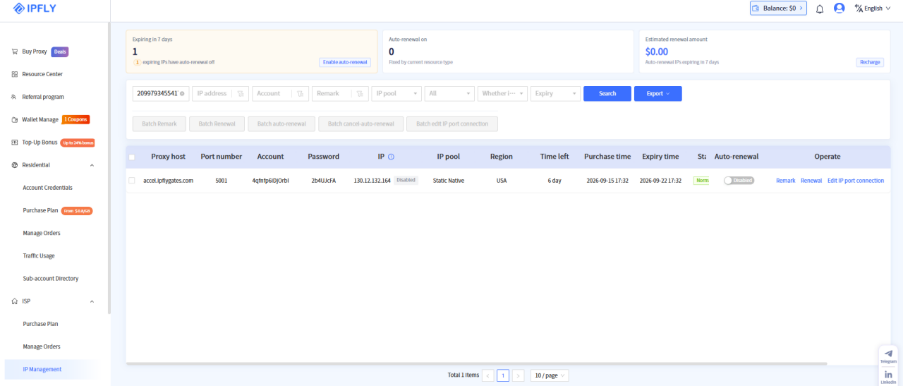
Keep these details ready before opening Hidemyacc. It is also important to confirm which connection protocol the proxy uses so the corresponding option can be selected correctly inside the browser profile.
4.2 Create a New Hidemyacc Profile
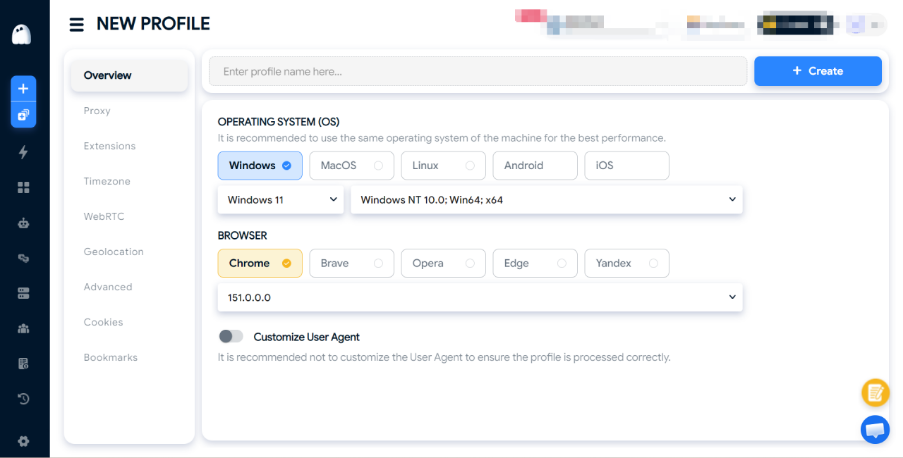
Open Hidemyacc and click New Profile.
Give the profile a recognizable name based on the account, client, or project it will be used for. Then configure the browser and operating system settings provided by the profile creation interface.
For consistency, the selected configuration should make sense for the intended browser environment rather than being changed unnecessarily.
4.3 Configure the Proxy
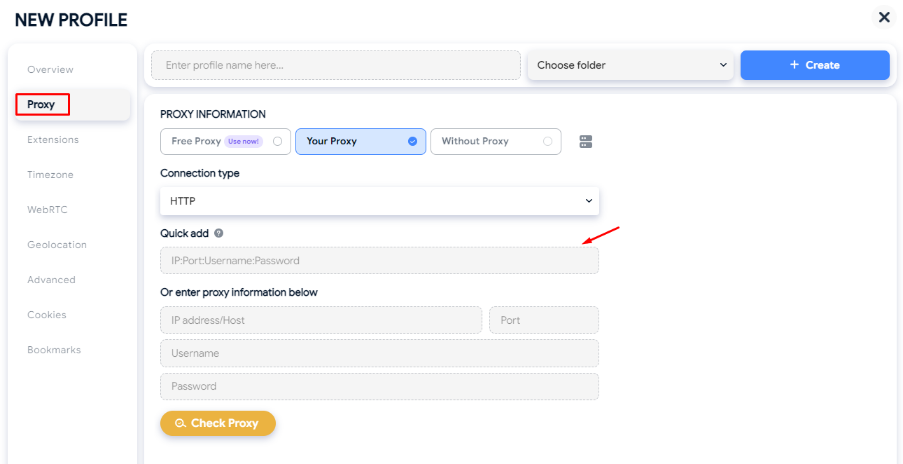
Next, open the Proxy section and select Your Proxy.
Choose the connection type that matches the proxy supplied by IPFLY, then enter the relevant host, port, username, and password.
A typical configuration will look like this:
4.4 Check the Proxy
Once the proxy information has been entered, click Check Proxy.
Hidemyacc will test the connection and display connection information when the configuration is successful.
When a connection fails, the first things to review are the proxy host, port, username, password, selected protocol, and any access restrictions configured by the proxy provider.
A successful proxy check confirms that the basic network connection is working. It does not mean that every website will necessarily interpret the IP or browser environment in the same way.
Clear Step-by-Step Proxy IP Tutorials
Master proxy setup, integration and performance optimization quickly with IPFLY guides
4.5 Launch and Verify the Profile
After the connection has been confirmed, click Create and launch the profile.
At this stage, users can visit an appropriate IP-checking or browser-diagnostic service to confirm that the profile is using the expected network connection and browser environment.
The review does not require a single benchmark score. A more useful check is whether the visible IP, timezone, browser information, language, and other relevant parameters are consistent with the intended setup.
Practical Configuration Tip
Consistency matters more than simply changing as many parameters as possible.
A browser profile should be configured around a clear purpose, while the network connection should match the intended region and workflow. Unnecessary changes to important browser or network attributes can make troubleshooting more difficult and complicate long-term profile management.
5. Practical Workflow Evaluation: What to Check Before Deployment
A useful review does not always require a benchmark score.
For browser profile management software, one of the more meaningful questions is whether the platform can support a stable and repeatable workflow.
Before deploying Hidemyacc for regular business operations, users can evaluate several areas.
5.1 Profile Isolation
Start by creating two or more browser profiles and confirm that their browsing environments remain separate.
Check whether cookies, local storage, browsing history, extensions, saved sessions, and profile-specific settings remain associated with the correct profile.
The objective is straightforward: activity in one profile should not unexpectedly affect another.
This is especially important when different environments are being used for separate projects or accounts.
5.2 Fingerprint Consistency
The next step is to inspect whether the browser environment behaves consistently with its configuration.
Look at information such as the user agent, operating system, screen settings, timezone, language, WebRTC behavior, and WebGL or GPU characteristics.
The purpose is not to assign Hidemyacc a universal fingerprint score. Instead, the objective is to identify obvious inconsistencies that could make the environment harder to manage or troubleshoot.
Hidemyacc also provides browser-environment checking tools that can be used to review IP information and other fingerprint-related parameters after a profile has been launched.
5.3 Proxy Compatibility
The browser environment should also be evaluated together with its network connection.
After assigning an IPFLY proxy, check whether the connection succeeds, whether the visible IP is the expected one, whether the approximate location makes sense for the intended workflow, and whether normal browsing remains stable.
It is useful to think of this as a combined environment rather than two completely independent products. Browser configuration and network configuration should both make sense for the purpose of the profile.
5.4 Profile Persistence
A practical workflow should also survive normal browser restarts.
After configuring a profile, close it and launch it again later. Check whether the browser settings remain unchanged, stored sessions are retained, extensions remain available, and the proxy configuration is still associated with the profile.
This is a simple test, but it can reveal whether the environment is practical for repeated daily use.
5.5 Multi-Profile Management
Finally, create several profiles and examine how efficiently they can be organized.
Pay attention to profile search, folder management, naming, duplication, sharing, transfer, and other routine tasks.
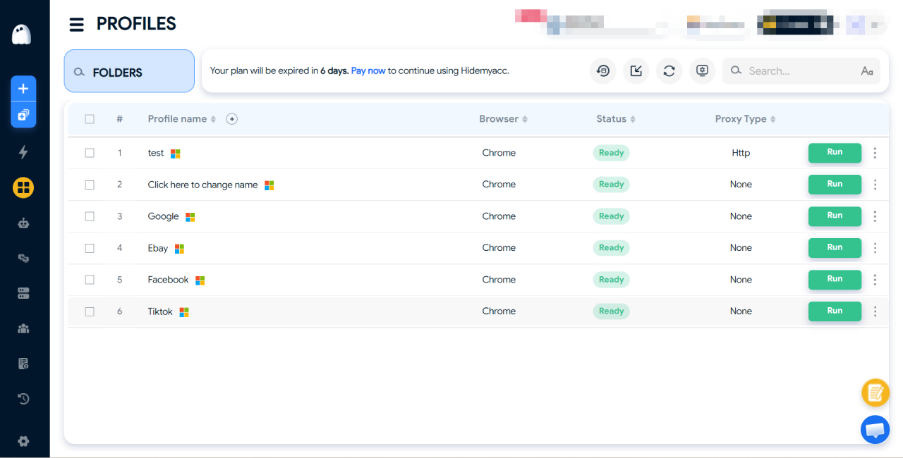
For larger organizations, these operational details can have a greater impact on productivity than any individual fingerprint setting because the number of browser environments eventually determines how much management overhead the team has to handle.
What This Evaluation Helps Determine
The purpose of this workflow evaluation is to answer a few practical questions.
Can browser profiles remain sufficiently separate?
Can browser and network configurations be maintained consistently?
Can users quickly identify, organize, and reuse the correct profile?
Can the workflow continue to function efficiently as the number of profiles increases?
The answers will vary according to the user’s device, browser version, proxy configuration, subscription plan, and intended use case. For that reason, these checks are better treated as a practical deployment assessment rather than a universal performance benchmark.
6. Pros and Cons of Hidemyacc
Hidemyacc’s main advantage is that several parts of browser environment management are brought together within one platform.
The profile-management system provides a structured way to separate projects and sessions, while fingerprint configuration gives users control over browser environment parameters. Proxy integration adds another layer of organization by allowing network connections to be associated directly with profiles.
For teams, collaboration features become another important consideration. Profile sharing, transfer, sub-accounts, shared folders, and permission management can simplify workflows where multiple employees need access to designated environments.
The platform also supports automation-related workflows, which can be useful when similar browser actions need to be repeated across several profiles.
There are also some considerations to keep in mind. Users managing a large number of profiles will generally need a higher subscription tier, and some advanced collaboration, synchronization, and automation features are only available on selected plans.
Configuration still requires care. Even when profile generation is automated, users should make sure the browser environment and network settings make sense together. An anti-detect browser also cannot replace broader security and privacy practices, and it cannot guarantee that a website will never detect, challenge, or restrict an account.
Finally, browser performance is not determined by the profile-management platform alone. Network quality, proxy characteristics, browser version, device resources, and the target website can all influence the overall experience.
7. Conclusion
Hidemyacc approaches browser profile management as a complete workflow rather than simply offering another browser interface.
Its main components—isolated profiles, fingerprint configuration, proxy management, collaboration tools, and automation—cover many of the requirements involved in managing multiple browser environments.
For individual users, the main benefit is organization. Separate profiles can help keep project data, browser sessions, and configuration settings from becoming mixed together.
For teams and agencies, the platform becomes more relevant as profile sharing, permissions, sub-accounts, synchronization, and automation become part of the daily workflow.
The proxy integration also makes Hidemyacc useful as part of a broader network-management setup. When paired with a dedicated proxy provider such as IPFLY, Hidemyacc can manage the browser environment while IPFLY supplies the network connection needed for legitimate regional browsing, research, testing, and related business applications.
The important question is therefore not whether Hidemyacc can provide an absolute guarantee against detection. No browser profile platform can provide that guarantee.
Instead, users should evaluate whether the combination of profile isolation, browser configuration, proxy management, collaboration, and automation fits the requirements of their particular workflow.
For users considering the platform, the available 7-day free trial provides an opportunity to test the profile-management experience, proxy integration, and other features before selecting a subscription.
To learn more about the platform and its current plans, visit Hidemyacc.
8. FAQ
1. What is Hidemyacc used for?
Hidemyacc is designed for managing multiple independent browser profiles on the same device. Common applications include e-commerce operations, digital marketing, market research, advertising verification, social media management, and team-based browser workflows.
2. Does Hidemyacc support proxies?
Yes. Hidemyacc provides proxy configuration and proxy management features. Users can assign a proxy to an individual browser profile and use the built-in proxy-checking function to verify the connection.
3. Can I use IPFLY with Hidemyacc?
Yes. IPFLY proxy credentials can be entered into a Hidemyacc browser profile using the supported proxy connection settings. Hidemyacc manages the browser environment while IPFLY provides the network connection.
4. How many browser profiles can Hidemyacc manage?
The current monthly plans range from 5 browser profiles on Mini to 1,000 on Business. Users with larger or specialized requirements can also explore custom plans.
5. Does Hidemyacc offer a free trial?
Yes. Hidemyacc currently advertises a 7-day free trial, allowing users to evaluate the platform before selecting a paid plan.
6. Is Hidemyacc suitable for teams?
Hidemyacc provides team-oriented features such as profile sharing, profile transfer, sub-accounts, shared folders, and permission management on supported plans. The exact capabilities depend on the subscription tier.
7. Does Hidemyacc guarantee protection from detection?
No. Browser fingerprinting is only one part of a broader collection of browser, network, and behavioral signals. No browser profile management platform can guarantee that a website will never challenge or restrict an account.
8. How should I choose a Hidemyacc plan?
Start by estimating the number of browser profiles your workflow requires. Then consider whether you need team collaboration, synchronization, automation, API access, or other advanced functionality. Comparing those requirements with the current plan limits will give you a clearer basis for choosing a subscription.
9. Should browser fingerprints and proxies be configured consistently?
Yes. A browser environment works best when its browser settings, timezone, language, and network configuration are logically consistent with the intended use case. The complete environment should be checked before it is used for regular operations.






