

In 2026, collecting data from the web is harder than ever. Many websites use strong security to stop automated scripts. You might have seen the famous Cloudflare “waiting room” or a checkbox that asks if you are a human. For a developer, these screens are a big wall. Simple Python scripts often crash when they hit these walls.
This is where FlareSolverr comes in. It is a powerful tool that acts as a bridge. It helps your code talk to websites that use Cloudflare. In this guide, we will look at how to set up FlareSolverr with Python. We will also show you how to use IPFLY‘s residential proxies to make your Market Research Automation stable and professional.
Understanding FlareSolverr: The Key to Modern Data Collection
Collecting data is a big part of business today. But websites are getting smarter. To stay ahead, you need to understand the tools that keep the internet open for your research.
What is FlareSolverr and Why Does It Matter in 2026?
FlareSolverr is a proxy server. It was made specifically to deal with Cloudflare challenges. Think of it as a middleman. When your Python script wants to visit a protected site, it sends the request to FlareSolverr.
FlareSolverr opens a hidden browser, solves the challenge, and gets the security cookies you need. Then, it passes those cookies back to your script. This allows your script to browse the site like a real person. In 2026, this is a “must-have” tool. Without it, your data collection projects will likely fail before they even start.
The Evolution of Anti-Bot Measures: Beyond Simple Captchas
Years ago, websites used simple pictures of cars or traffic lights to stop bots. Today, it is much more complex. Cloudflare now uses the “5-second challenge” and “Turnstile.” These systems look at your “browser fingerprint.”
A browser fingerprint is a collection of data about your computer. It includes your screen size, your fonts, and even how your mouse moves. If your script doesn’t look like a real browser, Cloudflare blocks you. FlareSolverr solves this by using a real browser head (like Chromium) in the background. It makes your automated requests look human. This is the highest level of expertise in modern web automation.
How FlareSolverr Fits into Your Scraping Stack
You might ask, “Why not just use Selenium or Playwright?” While those tools are great, they are heavy and slow for big projects. FlareSolverr is different because it acts as a lightweight API.
Your Python script stays fast and simple. It just asks FlareSolverr for help when it hits a Cloudflare wall. It is the perfect bridge between your clean Python code and a complex, protected website. By using this stack, you achieve Identity Protection because your main script never has to deal with the messy security scripts directly.
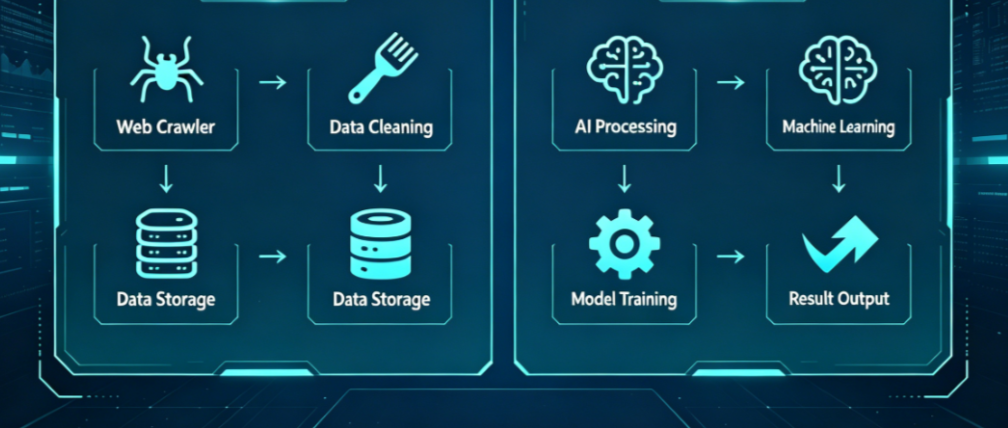
Step-by-Step: Setting Up FlareSolver for Your Project
Now that you know why you need it, let’s get it running. Setting up your environment correctly is the secret to a High ROI project.
Installing FlareSolverr via Docker (Recommended)
In my experience, the best way to run FlareSolverr is through Docker. Docker keeps the tool in a “container.” This means it won’t mess with other software on your computer.
Using Docker is very stable. If you are running a business, you cannot afford for your tools to break after an update. Docker ensures that FlareSolverr runs the same way every time. Here is a simple command to get started:
docker run -d --name=flaresolverr -p 8191:8191 -e LOG_LEVEL=info ghcr.io/flaresolverr/flaresolverr:latest
Once this is running, FlareSolverr is ready to work on port 8191. This setup is perfect for long-term Market Research Automation.
Local Installation and Configuration Basics
If you don’t want to use Docker, you can install it locally. You will need to download the binary for your operating system (Windows, Mac, or Linux). However, I usually advise against this for professional work. Local versions can have issues with “dependencies”—little pieces of software that need to be exactly right for it to work. If one thing changes on your PC, FlareSolverr might stop. Docker solves this by including everything it needs inside the container.
Understanding FlareSolverr API Endpoints
Once it is installed, you talk to FlareSolverr using simple API commands. The most important one is sessions.create. This starts a new “browser session” that stays open.
You can then send a get request. For example, if you want to visit a protected site, you send a JSON message to FlareSolverr. It tells the tool: “Go to this URL, solve the challenge, and tell me what you find.” It is very straightforward. You don’t need to be a coding genius to understand how the data flows.
FlareSolverr Python Integration: A Practical Code Guide
Let’s look at how this works in real life with Python. This is where your Market Research Automation starts to take shape.
Basic Python Implementation Using requests
You can use the standard requests library in Python to talk to FlareSolverr. You send a POST request to the FlareSolverr URL. Inside that request, you include the URL of the site you actually want to visit.
Here is a simple example: If you are trying to check prices on a protected e-commerce site, your Python script sends the site’s link to FlareSolverr. FlareSolverr does the hard work and returns the HTML code of the page. Your script can then read the prices easily.
Advanced Scraping with Selenium and FlareSolverr
Sometimes, you need more than just HTML. You might need the cf_clearance cookie. This cookie is like a “VIP pass.” Once you have it, you can browse the site for hours without being challenged again.
FlareSolverr can grab this cookie for you. You can then pass this cookie into a tool like Selenium. This is a very professional way to handle data collection. It saves time and reduces the risk of being blocked. By using IPFLYresidential proxies with this method, you become almost invisible to security systems.
Handling Timeouts and Retry Logic
Not every request will work the first time. Sometimes the internet is slow, or Cloudflare is extra tough that day. To build a great system, you must use “Retry Logic.”
This means if a request fails, your script waits a few seconds and tries again. In my years of experience, this is what separates a beginner from an expert. A good script doesn’t just quit when it sees an error. It stays calm, switches its IP address using IPFLY, and tries again. This ensures your workflow never stops, giving you the data you need exactly when you need it.
By following these steps, you are building a professional system for 2026. You are using the best tools like FlareSolverr and the best proxies like IPFLY. This combination ensures your data is accurate and your identity is safe.
Clear Step-by-Step Proxy IP Tutorials
Master proxy setup, integration and performance optimization quickly with IPFLY guides
Boosting Success Rates: The Role of Identity Protection
Even with a great tool like FlareSolverr, you might still run into walls. To succeed in 2026, you must understand that software is only half of the puzzle. The other half is your internet identity.
Why Your IP Reputation is the “Invisible Factor”
In my years of working with web data, I have seen many people fail because of poor IP quality. You might set up FlareSolverr perfectly, but the website still keeps showing you challenges. This is called an “infinite loop.”
It happens because your IP address looks “dirty” to the website. If you use a cheap server IP, Cloudflare marks you as a bot immediately. Even if FlareSolverr solves the first puzzle, the website will just throw another one at you. This wastes your time and money. A clean IP is the “invisible key” that makes everything work smoothly.
IPFLY Residential Proxies: The Ultimate Privacy Enhancement
If you want a “VIP pass” through security walls, you need IPFLY Residential Proxies. These are not regular server IPs. They are real addresses from real homes.
When you use IPFLY, Cloudflare sees a person browsing from their living room. This is the highest level of Identity Protection. In 2026, real ISP residential IPs are the only way to consistently pass high-level security checks. By using IPFLY, you provide the “clean environment” that FlareSolverr needs to do its job. This combination makes your data collection feel natural and human.
Static ISP vs. Rotating Proxies in FlareSolver Tasks
Choosing the right proxy type is very important for your workflow.
- Rotating Proxies: These change your IP every time you make a request. They are perfect for collecting small bits of data from thousands of different pages.
- Static ISP Proxies: These give you one stable IP address for a long time.
For FlareSolverr tasks, Static ISP proxies are often better for “Long-session” work. If you are logged into a site, changing your IP too fast can look suspicious. Keeping a consistent identity helps you stay logged in and prevents security alerts. IPFLY offers both, so you can choose the one that fits your specific project.
Case Study: Scalable Market Research Automation
Let’s look at how a real business uses these tools together. Imagine a global fashion brand that needs to check prices on major e-commerce sites every hour.
Scenario: Scraping High-Security E-commerce Sites
These websites have very high security. They use Cloudflare to block anyone who isn’t a real customer. In our case study, the fashion brand used FlareSolverr to handle the browser challenges. They integrated it with their Python scripts to pull price lists automatically. This allowed them to see exactly what their competitors were doing in real-time.
Optimizing Throughput with IPFLY Global Nodes
To get the best data, the brand needs to see prices in different countries. Prices in London are different from prices in New York. The brand used IPFLY’s 195+ country nodes to change their location.
By switching nodes, their FlareSolverr setup could look at the UK version of a site at 9:00 AM and then the Japanese version at 9:05 AM. This “geographic camouflage” is essential for accurate global research. IPFLY makes this easy by giving you access to a massive global pool of home-based IPs.
Achieving Cost-Effective Results at Scale
Many companies spend thousands of dollars on expensive anti-bot services. But the combination of FlareSolverr and IPFLY provides a High ROI.
Instead of paying a high price for every single page you visit, you own your setup. You pay for the proxies you use, and FlareSolverr (which is open-source) handles the challenges. This is a much more cost-effective way to scale your business. It gives you more control and better data for less money.
Ethical Considerations and Legal Compliance
As a professional, you must always be ethical. Data collection should follow the rules of the internet.
Respecting Robots.txt and Rate Limits
Always check a website’s robots.txt file. This file tells you which parts of the site are open for automated tools. Also, don’t send too many requests too fast. Even with FlareSolverr, “hammering” a server is bad practice. Set a reasonable speed so you don’t slow down the website for real users.
Data Privacy and Global Regulations (GDPR/CCPA)
Privacy laws like GDPR and CCPA are very strict in 2026. Never collect private data about individuals without their permission. Focus on public data, like product prices or public reviews. Using IPFLY ensures your own Identity Protection, but you must also respect the privacy of others.
Troubleshooting and FAQ
Even the best systems have hiccups. Here is how to fix common problems.
“Max retries exceeded” – How to fix common FlareSolverr errors?
If you see this error, it usually means FlareSolverr cannot solve the challenge fast enough.
- Check your IPFLY proxy. If the IP is slow, the challenge might time out.
- Increase your “timeout” setting in your Python code.
- Ensure your Docker container has enough memory to run the browser.
Can FlareSolver solve hCaptcha or reCAPTCHA v3?
FlareSolver is great for Cloudflare challenges like Turnstile and the 5-second challenge. However, for complex image captchas (like “click all the buses”), it might need help from a captcha-solving service. In 2026, most sites use silent challenges that FlareSolverr handles perfectly.
How to integrate IPFLY proxies directly into FlareSolver?
You can set up your proxy when you start your Docker container. This is a very professional way to keep your environment clean.
You use an environment variable called PROXY_URL. When you run the Docker command, you include your IPFLY details. This tells FlareSolver to use that specific residential IP for every challenge it solves. It is a one-time setup that ensures all your requests stay safe and private.
In 2026, knowing how to use FlareSolverr and Python is a powerful skill. It allows you to gather the data you need to grow your business. But remember, tools are only one part of the story.
High-quality Identity Protection is your true shield. By combining the smart logic of FlareSolverr with the trusted residential proxies from IPFLY, you can overcome any connectivity challenge. You will build a stable, cost-effective system that stays invisible and delivers results every time. Start building your bridge to better data today!






