


A Telegram SMS Fee message can appear when someone tries to create an account or log in on a new device. Instead of receiving a verification code straight away, the user sees a payment screen.
The message can raise a question: Is Telegram still free? Yes. Telegram’s basic service remains free, but some phone verification attempts may require a payment. Other login methods may be available, depending on the account and the options shown in the app.
Before paying, it helps to understand what the fee covers and whether another verification method is available. This guide explains the prompt and the steps to take when it appears.
What Is the Telegram SMS Fee?
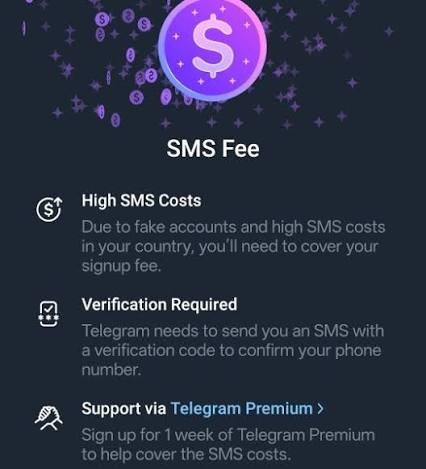
The TelegramSMS Fee is a payment that may be requested during phone number verification. It can appear when Telegram needs to send an SMS code for account registration or login.
Telegram’s fee screen describes the charge as a one-time fee and presents a short Telegram Premium subscription as a way to cover SMS costs. The price and payment terms shown in the app should be checked before proceeding.
The fee is connected to a particular verification attempt. It does not mean that every Telegram user must pay to send messages or use the basic app. It is also separate from any charges a mobile carrier may apply under a phone plan.
Why Does Telegram Show an SMS Fee?
Telegram may show an SMS Fee when the cost of sending a verification code is high for a particular country or mobile provider. According to its developer documentation, some login or signup attempts require a Telegram Premium purchase to proceed because of these SMS costs.
Telegram’s fee screen also mentions fake accounts. It does not, however, explain every factor behind an individual prompt. Seeing the fee does not by itself mean that a particular device, phone number, or IP address has been flagged.
Why Do Some Users See the Telegram SMS Fee While Others Don’t?
The TelegramSMS Fee does not appear in every verification flow. One reason is that SMS may not be needed in every login attempt.
According to the Telegram FAQ, a login code may be sent through Telegram instead of SMS if the account was recently used on another device. A new account does not yet have an existing session to receive that code.
The options shown can also depend on the login methods already set up and those available for the current attempt. An existing session or passkey does not guarantee that Telegram will offer it every time. If the app requires SMS verification, it may present the fee before sending the code.
Is the TelegramSMS Fee Prompt Real?
The TelegramSMS Fee prompt is real, but not every payment request that mentions it is trustworthy. Telegram has an official verification screen that may ask for payment when an SMS code is required.
A legitimate prompt appears as part of the verification process in the Telegram app. Before following a payment request, check that the app came from an official source, such as the Telegram download page or an official app store listing.
Be cautious with messages or websites that claim to remove the fee. A third party may ask for a login code, a two-step verification password, or a separate payment in exchange for account access. A login code can be used to access the account, so it should never be shared with another person.
If the prompt appears in an official app, review the amount and terms on the screen. Payment is one possible next step, but an existing Telegram session or another available login method may offer a way to verify without requesting a new SMS.
Which Telegram SMS Fee Solution Should You Try?

The right approach depends on whether the account already exists and which login methods are available. An active Telegram session or a previously configured passkey may provide another way to sign in. If neither is available, check the phone number and follow the verification options shown in the app.
| Situation | First step |
| Telegram is open on another device | Check that device for a login code |
| A passkey was set up earlier | Look for the passkey option on the login screen |
| Signing in to Telegram Desktop or Web | Check whether QR code login is available |
| The phone number or SMS service may be the issue | Verify the number and check SMS reception |
| Telegram requires payment and offers no other method | Review the official payment screen |
| Payment or verification fails | Contact Telegram support |
The table is a starting point. The steps below explain how to check each option and what to do if it is unavailable.
How to Deal With the Telegram SMS Fee

1.Check for a Code on an Existing Device
Telegram may send a login code to an active session instead of sending it by SMS. Check any phone, tablet, or computer where the account may still be signed in.
- Open Telegram on the device that is already logged in.
- Look for a message containing the login code in the verified Telegram service conversation.
- Enter the code on the new device.
Keep the existing session open while completing the new login. If no code arrives there, follow the options shown on the new device. An active session does not guarantee that Telegram will offer an in-app code for every attempt.
2.Try QR Code Login or a Passkey
An existing session may also help with QR code login. When Telegram Desktop or Telegram Web offers this option, open Telegram on the logged-in phone, go to Settings → Devices, and select the option to link a desktop device. Scan the QR code displayed on the computer and follow any remaining prompts.
A passkey is another possible option for an account that already has one set up. If the login screen offers passkey sign-in, follow the device’s instructions to authenticate. A passkey must be created in advance; it cannot be assumed to exist for a new account or an account that has never set one up.
3.Check Other Verification Methods Offered by Telegram
Telegram may show other ways to receive or confirm a code during the login process. The available options depend on the account and the current verification flow.
If the screen offers a phone call, email, or another method, follow the instructions provided there. Some options may only appear after a waiting period, while others may not be offered at all. Having two-step verification enabled does not mean email verification will always be available as a substitute for SMS.
4.Check Your Phone Number, Including Virtual Numbers
A number entered with the wrong country code can prevent verification from reaching the intended phone. Check the complete international format before requesting another code. For a US number, the country code is +1.
Also confirm that the number is active and can receive SMS messages. If the device is abroad, check whether the mobile plan supports receiving messages while roaming. The carrier can help investigate delivery problems.
Virtual or temporary numbers require extra care. A number shared with other users may expose verification messages, and a temporary number may be unavailable when the account needs verification again. A number under long-term personal control is easier to use for future account access. Telegram may still determine which numbers and verification methods it accepts.
Clear Step-by-Step Proxy IP Tutorials
Master proxy setup, integration and performance optimization quickly with IPFLY guides
5.Check Your Network Connection and IP Setup
A working internet connection allows the Telegram app to communicate with its servers. If the app cannot load the verification screen or stays on “Connecting,” check whether other apps can connect and try another reliable network.
If a proxy is configured, check its server address, port, protocol, and credentials. A proxy address identifies the server used to route the connection; Entering the wrong address or port can prevent the app from connecting.
For Telegram specifically, a SOCKS5 proxy can be configured in the app’s proxy settings. The Telegram proxy setup guide explains where to enter the server details on mobile and desktop and how to check the connection.
Changing a network or proxy can help isolate a connection problem. It is not a confirmed way to remove the SMS Fee: the internet connection and phone verification are separate parts of the process.
6.Use an Official Telegram App and Avoid Repeated Attempts
Install or update Telegram through an official source before troubleshooting further. Older or modified apps may have compatibility or security problems, and they should not be treated as guaranteed ways to avoid the fee.
If Telegram displays a countdown or asks for a waiting period, allow it to finish before requesting another code. Repeated requests can make it harder to track which code is current and may lead to additional waiting.
7.Consider Telegram X and Understand Its Limits
Telegram X is another Telegram client that some users discuss when looking for a different login experience. However, switching clients is not a confirmed or reliable way to remove the SMS Fee. The available verification flow may still require the same payment.
If trying another client, obtain it from a trusted official listing and check the options it actually presents. Avoid modified apps that promise a guaranteed fee bypass.
8.Pay Through the Official Flow If SMS Is Required
If no other login method is available and Telegram requires payment to send the SMS, review the official payment screen before proceeding. Check the amount, currency, Premium duration, and any subscription terms shown by the payment provider.
Complete payment only through the flow presented by the official app. Do not send money to a person offering to verify the account or remove the fee.
Payment and SMS delivery are separate steps. If payment succeeds but the code does not arrive, check the number and SMS reception before seeking help.
9.Contact Telegram Support If Verification Still Fails
Use the Telegram support form if the payment fails, the app remains stuck, or verification cannot be completed after payment.
A useful report can include the phone number with its country code, mobile carrier, device type, app version, and the exact error message. If a payment was made, keep the receipt for any follow-up with the payment provider. Do not include a login code or two-step verification password in the report.
Get a Stable Connection With IPFLY Static Residential Proxies

Users who already need a consistent proxy endpoint for their online work can consider IPFLY Static Residential Proxies. They provide dedicated, non-rotating IP addresses and support HTTP(S) and SOCKS5.
A static residential proxy keeps the same assigned IP instead of changing it automatically between requests. Before choosing a proxy, check that the app or device supports the required protocol and that the selected location suits the task.
A consistent network connection can be useful when using Telegram across longer sessions. For users who need a fixed proxy endpoint, IPFLY Static Residential Proxies provide dedicated, non-rotating IP addresses and support HTTP(S) and SOCKS5.
A static residential proxy keeps the same assigned IP instead of changing it automatically between requests. This gives users a consistent endpoint for compatible applications and workflows.
Before choosing a proxy, check that the device or app supports the required protocol and that the selected location suits the task. After setup, verify that the proxy connects successfully and that Telegram loads normally.
FAQ
Is Telegram free to use if I see an SMS Fee?
Yes. Telegram’s basic service remains free. The SMS Fee may appear during a specific phone verification attempt; it does not mean every Telegram feature requires payment.
How much is the Telegram SMS Fee?
There is no single amount to assume for every user. Check the price, currency, and terms displayed in the official app before completing payment.
Will I always receive a code after paying the fee?
No. Payment does not guarantee that an SMS will be delivered. If the code does not arrive, check that the number is correct and can receive messages, then contact Telegram support if the problem continues.
Can a new Telegram account use a passkey instead of SMS?
A passkey generally needs to be set up for an existing account before it can be used to sign in. A new account should follow the verification options shown during registration.
Telegram Gateway is a service that businesses can use to deliver verification codes for their own services through Telegram. It is separate from the SMS Fee that may appear when an individual registers for or logs in to Telegram.
Conclusion
The Telegram SMS Fee may appear when a phone number requires SMS verification. Start by checking for an existing session, a configured passkey, or another option offered by the app. If payment is required, review the terms in the official flow and contact support if verification still fails.
For users who need a consistent connection for longer sessions, IPFLY Static Residential Proxies provide a dedicated, non-rotating IP address for compatible applications.


