

School networks are among the most heavily filtered and monitored internet environments. From blocking social media and gaming sites to logging every URL a student visits, the institutional push for safety and productivity creates a digital landscape that feels restrictive. It is no surprise that many students turn to “proxy websites for school”—free web‑based services that promise to open blocked content or hide browsing activity from network administrators. A quick search turns up dozens of such sites, all offering a seemingly identical deal: enter a URL, and the proxy fetches the page, showing it through a frame while hiding the student’s IP address from the destination.
The surface appeal is strong, but the underlying is alarming. Most free proxy websites for school operate with no transparency about who runs them, what data they collect, or how they secure the traffic that flows through them. They are often funded by aggressive advertising, are riddled with trackers, and may even inject malware into the very pages they serve. Worse, they log every request, creating a permanent record of a student’s browsing that can be sold, exposed in a breach, or handed over to third parties. The tool that promised anonymity becomes the most invasive surveillance mechanism in the student’s digital life.
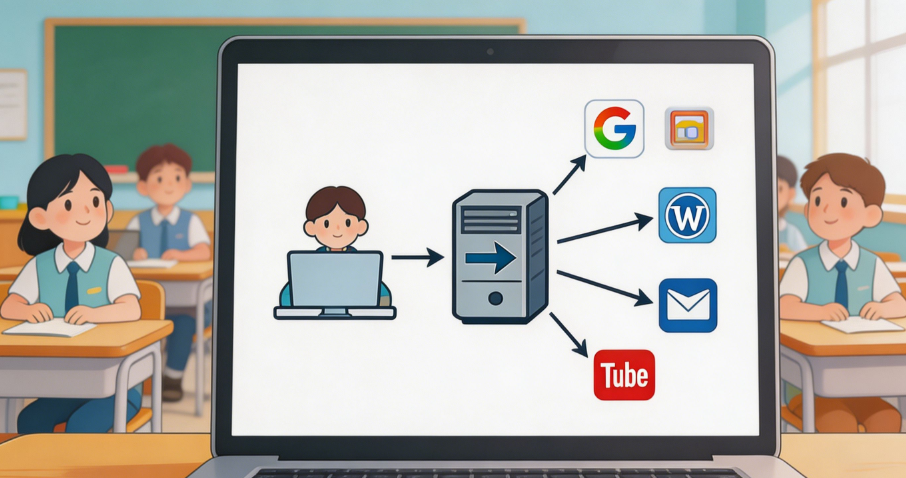
This guide exposes the ten most critical risks of using proxy websites for school and shows how IPFLY’s residential and datacenter proxy network provides a fundamentally different—and genuinely private—alternative. IPFLY does not operate public proxy websites. Instead, it provides clean, ISP‑registered IP addresses that students can use directly within a browser to encrypt their traffic, mask their real IP, and prevent any intermediary from logging or tampering with their data. The result is a secure, private browsing session that protects the student’s identity and information without the dangers that come with free proxy sites.
What Are Proxy Websites for School and Why Are They So Risky?
A proxy website for school is a web page that acts as an intermediary. The student types a blocked URL into a form on the proxy site. The proxy’s server then requests that URL on behalf of the student, retrieves the content, and displays it back within the proxy’s own page. To the school network, it appears that the student is simply visiting the proxy domain—not the blocked destination.
The problem lies in the proxy itself. Most of these sites are operated by anonymous individuals or shadowy ad‑tech operations with no privacy policy. They are not bound by any data protection regulation, and many are explicitly designed to harvest user data. Every URL visited, every search term typed, every login credential entered into a page served through the proxy—all of it passes through the proxy operator’s server in plain view. The student has no way to know whether the connection is encrypted, whether the operator is logging data, or whether the pages being served have been altered to include malicious scripts.
IPFLY’s approach is entirely different. IPFLY is not a web‑based proxy. It is a professional proxy network that provides residential IPs—addresses assigned by real internet providers like Comcast, AT&T, and Deutsche Telekom—that students can configure directly in a browser. The student’s traffic is encrypted from the device to IPFLY’s gateway, and then exits to the internet from a clean residential IP. No third‑party proxy website sees the traffic, no ads are injected, and no logs of the student’s activity are kept. The IPFLY endpoint acts as a transparent, encrypted tunnel, not as a content‑inspecting middleman.
Top 10 Dangers of Proxy Websites for School—and How IPFLY Neutralizes Each
1. Permanent IP Logging by the Proxy Operator
When a student uses a free proxy website, the proxy server logs the student’s real IP address alongside every URL requested. This is standard server behavior. The proxy operator can store these logs indefinitely, sell them to data brokers, or expose them in a data breach. The student’s browsing history, tied directly to their home or school IP, becomes a commodity.
IPFLY’s residential proxies eliminate this danger by removing the proxy website from the equation entirely. The student configures their browser to connect through an IPFLY endpoint. The IPFLY gateway does not log browsing activity. The only IP visible to the outside world is the IPFLY residential IP—a clean address from an ISP that cannot be traced back to the student. There is no proxy operator collecting logs, because there is no web‑based proxy involved.
2. Man‑in‑the‑Middle Interception of Unencrypted Traffic
Many free proxy websites do not support HTTPS properly. They may connect to the target site over HTTPS but serve the content back to the student over plain HTTP, exposing all data in transit. Even when they do use HTTPS, the proxy terminates the encryption, meaning the operator can see the full content of every page—including passwords, messages, and personal details entered into forms.
IPFLY’s endpoints use strong TLS encryption from the student’s device to the IPFLY gateway. The connection from the gateway to the destination also uses HTTPS where supported. The student’s traffic is encrypted end‑to‑end, with IPFLY acting as a transparent conduit, not a content inspector. No operator reads the traffic; no plain‑text version exists on the wire.
3. Malware Injection and Script Alteration
Because the proxy website controls the page that the student sees, it can inject additional JavaScript, alter HTML, or embed malicious advertisements before displaying the content. A student who visits a trusted educational site through a free proxy may unknowingly execute a cryptocurrency miner, a keylogger, or a redirect to a phishing page.
IPFLY proxies do not modify traffic. They operate at the network layer, forwarding packets without inspecting or altering the payload. The student receives exactly what the destination server sends. Combined with a standard ad‑blocker, the browsing session is both private and free of injected malware.
4. Aggressive Advertising and Tracker Networks
Proxy websites for school are overwhelmingly funded by advertising, and the ad networks they use are often the least reputable. Pop‑unders, fake “Download” buttons, and intrusive tracking scripts are the norm. These ads do more than annoy—they track the student across sessions, build behavioral profiles, and can serve as vectors for malvertising attacks.
IPFLY has no advertising model. The service is subscription‑based, with revenue coming directly from users. There are no third‑party scripts, no injected ads, and no trackers. The student’s browsing through IPFLY is invisible to the ad‑tech ecosystem.
5. Session Hijacking and Credential Theft
When a student logs into a website through a free proxy, their username and password pass through the proxy server. A malicious proxy operator can capture these credentials and use them to hijack accounts. Even if the proxy operator is not intentionally malicious, a security flaw in the proxy’s software could expose session cookies to other users of the same proxy.
IPFLY’s encrypted tunnel prevents any intermediary from seeing the contents of the student’s traffic. Credentials are encrypted between the student’s device and the destination server. IPFLY’s infrastructure is professionally secured, with no shared‑user vulnerabilities. The student can log into educational portals, research databases, and personal accounts without fear of interception.
6. No Privacy Policy or Data Protection
Free proxy websites rarely publish a privacy policy, and when they do, it is often vague or outright deceptive. The operator may be located in a jurisdiction with no data protection laws. The student has no legal recourse if their data is misused. In contrast, IPFLY is a commercial service with clear terms of service and a professional obligation to protect user data. The company’s infrastructure is designed with privacy as a core feature, not as an afterthought.
7. Slow Speeds and Unreliable Connections
The servers that power free proxy websites are often overloaded, under‑provisioned, and located far from the student. Page loads are slow, videos buffer endlessly, and connections drop frequently. A student trying to access a multimedia‑rich educational resource through such a proxy will be met with frustration.
IPFLY’s residential and datacenter IPs are hosted on high‑performance infrastructure with direct peering to major backbones. The connections are fast and stable. For data‑intensive tasks, IPFLY’s datacenter proxies provide the lowest latency and highest throughput. For general browsing that requires residential trust, IPFLY’s dynamic residential proxies deliver reliable speeds with the added benefit of appearing as a home internet connection.
8. School Network Blocks on Proxy Domains
School IT departments actively maintain blocklists of known proxy domains. A student who relies on a public proxy website will find that the proxy itself becomes blocked—often within days of its appearance. The student is back to square one, searching for yet another proxy. This cat‑and‑mouse game is a constant source of friction and never provides a lasting solution.
Because IPFLY is not a web‑based proxy but a network‑level service, it does not rely on a public‑facing proxy domain that can be easily blocked. The student configures their browser to connect to an IPFLY endpoint directly. The school network sees an encrypted connection to an IP address, not a visit to a known proxy site. The connection is indistinguishable from any other HTTPS traffic, making it far less likely to be flagged or blocked by content filters.
Complete Proxy IP Fundamentals
Build a full proxy knowledge framework — from core principles to protocol selection
9. Exposure of Sensitive Research and Personal Data
Many students use proxy websites to access resources for legitimate academic work—such as international news archives, public data sets, or research publications that may be incorrectly categorized by the school’s filter. When they do so through a free proxy, all of their search queries and reading material are exposed to the proxy operator. A student researching a sensitive topic—mental health, political dissent, personal identity—unwittingly shares that information with an unknown third party.
IPFLY’s residential proxies provide a confidential channel for academic research. The student’s queries are encrypted, and the IP address visible to the destination is a clean residential IP with no link to the student. The student can pursue any topic of inquiry without fear of surveillance by the proxy operator or the network administrator.
10. Legal and Disciplinary Consequences
School acceptable‑use policies often explicitly prohibit the use of proxy websites. A student caught using one may face disciplinary action, loss of network privileges, or even academic penalties. The irony is that the student’s use of the proxy is easily detectable: the school network logs the connection to the proxy domain, and the proxy itself may log the student’s IP alongside the very activity the student sought to hide.
IPFLY’s encrypted tunnel prevents the school network from seeing the destinations the student visits. The network sees only an encrypted connection to the IPFLY gateway. While the student must still comply with their school’s policies, the technical risk of having their browsing history exposed to network administrators is eliminated. The student’s privacy is preserved, and the potential for disciplinary action based on logged browsing data is removed.
How IPFLY Provides a Genuinely Private Alternative to Proxy Websites for School
IPFLY replaces the insecure web‑based proxy model with a direct, encrypted connection to a residential IP. The student’s browser is configured to send all traffic through the IPFLY endpoint. From there, it exits to the internet from a clean, ISP‑registered address. The school network sees only an encrypted stream to a single IP; it cannot inspect the traffic or log the destinations.
The setup requires no installation of software—only a browser configuration that takes minutes. The student can use a portable browser on a USB drive with the proxy settings pre‑configured, ensuring that their private browsing environment is completely separate from the school’s monitored browser.
Dynamic Residential IPs for Everyday Private Browsing
For day‑to‑day use—accessing research sites, checking personal email, or reading news—IPFLY’s dynamic residential proxies provide a rotating IP that changes with each session or request. This prevents any single IP from accumulating a browsing history that could be profiled. The student appears as a series of unrelated home users, each making normal, low‑volume requests. There is no persistent identifier, no tracking, and no exposure of the student’s real IP.
Static Residential IPs for Persistent Sessions
For students who need to maintain a consistent identity—for example, logging into a research database that requires IP whitelisting, or accessing a personal account that triggers security alerts on IP changes—IPFLY’s static residential proxies provide a fixed, ISP‑registered address. The student can use this IP for weeks or months, building a trusted history with the target site while keeping their real IP hidden from both the site and the school network.
SOCKS5 with Remote DNS for Complete Leak Prevention
IPFLY’s endpoints support SOCKS5 with remote DNS resolution. When the browser is configured to use this protocol, all DNS queries are tunneled through the proxy and resolved at the IPFLY exit node. The school’s DNS servers never see which domains the student is resolving. This prevents DNS‑based logging and ensures that no accidental leak reveals the student’s browsing intent.
Step‑by‑Step: Setting Up IPFLY on a School Device
The following steps create a private, encrypted browsing session on any computer, without installing software or leaving traces on the school machine.
- Create an IPFLY account and generate a dynamic residential endpoint in the desired country. For general privacy, the student’s home country is appropriate.
- Prepare a portable browser. Download a portable version of Firefox or Chromium onto a USB drive. This browser will be configured exclusively for IPFLY‑routed traffic.
- Configure the proxy. In the browser’s network settings, enter the IPFLY endpoint details (hostname, port, username, password). Select SOCKS5 if available, with the “Proxy DNS when using SOCKS5” option enabled.
- Harden the browser. Disable WebRTC through the browser’s configuration flags or an extension. Set the browser’s language and timezone to match the proxy IP’s location to avoid fingerprint mismatches.
- Test the connection. Visit an IP‑checking website. Confirm that the displayed IP is the IPFLY residential IP, not the school’s network IP. Run a DNS leak test to verify that all name servers belong to the proxy network.
- Browse. The session is now encrypted and anonymous. The school network sees only an HTTPS connection to the IPFLY gateway, and the destination websites see a clean residential IP.
For automated tasks or research data collection, the proxy can be integrated into scripts using a standard proxy URL. A minimal Python example:
import requests

proxies = {
    "http": "http://user:pass@res.ipfly.net:8080",
    "https": "http://user:pass@res.ipfly.net:8080"
}

response = requests.get("https://example-research-db.com", proxies=proxies)
print(response.status_code)
Case Study: A Student Researcher Protects Sensitive Data on Campus Wi‑Fi
A graduate student in public health was conducting a systematic review of literature on a politically sensitive topic. The research required accessing international news sites and public‑health databases, some of which were blocked by the university’s content filter due to overzealous keyword matching. The student initially used a free proxy website to access these resources. Within a week, the student’s university account was flagged for visiting a known proxy domain, and the IT department issued a warning. Worse, the proxy site was later found to be injecting cryptocurrency mining scripts, causing the student’s laptop to overheat and slow dramatically.
The student switched to IPFLY’s static residential proxy. A portable browser on a USB drive was configured to route all research traffic through a clean residential IP in the same country as the university. The SOCKS5 protocol with remote DNS prevented the university network from logging the research destinations. The static IP provided a consistent identity that the research databases trusted, avoiding CAPTCHAs and login challenges.
Over six months, the student completed the literature review without a single network block, IT warning, or malware incident. The encrypted tunnel ensured that the research topic remained confidential. The student’s methodology section acknowledged the use of privacy‑preserving network tools to maintain academic freedom and data security.
The Real Proxy Websites for School Are the Ones That Respect Your Privacy
Free proxy websites for school are not tools of liberation; they are data‑collection traps disguised as utilities. They log, inject, and sell user data while providing a false sense of security. IPFLY’s residential and datacenter proxies offer a genuinely private alternative—an encrypted, transparent tunnel that hides the student’s real IP, prevents tracking, and secures data without any of the risks associated with web‑based proxies. In an environment where every click is monitored, choosing the right proxy is not just about access; it is about protecting one’s digital identity and academic freedom.

Browse School Networks with Real Privacy
Don’t trust your data to anonymous proxy websites. Sign up for IPFLY and set up a residential endpoint. Configure your browser in minutes, and experience what true online privacy feels like—even on the most heavily monitored campus networks.






